
Artificial intelligence has revolutionized how we approach writing, content creation, and communication. The explosion of AI writing tools over the past few years has made professional-grade content generation accessible to everyone—from individual bloggers to enterprise marketing teams.
ChatGPT by OpenAI transformed the landscape when it launched, but it’s no longer the only player in the game. Today, there are dozens of powerful free AI writing tools that rival or exceed ChatGPT’s capabilities in specific areas. Whether you’re a content marketer looking to scale your blog output, a student trying to improve essay quality, or a business owner managing multiple communication channels, there’s an AI writing solution tailored to your needs.
This comprehensive guide explores the best free AI writing tools like ChatGPT, analyzing their features, strengths, and ideal use cases so you can make an informed decision for your workflow.
What Are AI Writing Tools?
Definition and Core Functionality
AI writing tools are sophisticated software applications that leverage large language models (LLMs) to generate human-like text based on user prompts and inputs. These tools use machine learning algorithms trained on vast datasets of written content to understand language patterns, context, and nuance.
Unlike traditional word processors or template-based writing software, AI writing assistants:
- Generate original content from brief descriptions or keywords
- Adapt writing style to match different tones (professional, casual, creative)
- Provide research support by synthesizing information from multiple sources
- Offer real-time editing and improvement suggestions
- Save time by automating repetitive writing tasks
How They Work
Most AI writing tools operate through a conversational interface where users input prompts—natural language instructions describing what they want written. The underlying AI model then processes this request and generates appropriate output. Advanced tools can:
- Understand context from previous conversations
- Follow complex multi-step instructions
- Generate content in various formats (blog posts, emails, product descriptions, code)
- Maintain brand voice and tone consistency
- Incorporate SEO best practices automatically
Top Free AI Writing Tools & ChatGPT Alternatives
1. Claude by Anthropic
Claude has earned strong recognition as one of the best alternatives to ChatGPT, particularly for long-form writing and structured reasoning. Claude excels at generating detailed, well-organized content with superior reasoning capabilities.
Best For:
- Essay and article writing
- Technical documentation
- In-depth analysis and research
- Long-context understanding
Free Tier:
- 5 messages per day (limited free version)
- Upgrade for unlimited access
2. Google Gemini
Google Gemini (formerly Bard) integrates seamlessly with Google Workspace tools and offers strong capabilities in technical reasoning and coding assistance. It’s particularly valuable if you’re already invested in Google’s ecosystem.
Best For:
- Integration with Gmail, Docs, and Sheets
- Technical and coding questions
- Large context window processing
- Real-time information (via Google Search integration)
Free Tier:
- Fully free access to Gemini 1.5 Flash
- Generous usage limits
3. Perplexity AI
Perplexity stands out as the best AI research tool with cited sources. Unlike ChatGPT, which sometimes generates responses without proper sourcing, Perplexity emphasizes transparency and citation.
Best For:
- Research and fact-checking
- Information synthesis with citations
- Academic writing
- Journalism and reporting
Free Tier:
- Free web access with limited daily queries
- Premium subscription for extended use
4. Microsoft Copilot
Microsoft Copilot brings generative AI directly into your daily workflow, especially if you use Microsoft 365 applications. It’s deeply integrated into Word, Excel, PowerPoint, Outlook, and Teams.
Best For:
- Microsoft 365 users
- Professional document creation
- Meeting summarization
- Email drafting and response
Free Tier:
- Free basic access
- Free version in Windows and Edge
- Pro version with enhanced features
5. Chatsonic (by Writesonic)
Chatsonic combines conversational AI with voice response capabilities and real-time web access. It’s an excellent choice if you need customer service automation and platform integrations.
Best For:
- Customer service chatbots
- Marketing copy generation
- Multi-platform chatbot integration
- Voice-enabled applications
Free Tier:
- 10,000 words monthly
- Basic chatbot functionality
6. Writesonic
Writesonic specializes in marketing and copywriting content generation with impressive speed and creativity. It’s purpose-built for advertisers and content marketers.
Best For:
- Marketing copy and ad creation
- Product descriptions
- Sales pages and landing pages
- Email marketing campaigns
Free Tier:
- 10,000 words monthly
- Access to core templates
- Limited AI tools
7. Character.AI
Character.AI takes a unique approach by allowing users to create and interact with custom AI personas. This makes it invaluable for creative writers, role-playing scenario development, and brainstorming.
Best For:
- Creative writing and storytelling
- Character development for fiction
- Roleplay and dialogue creation
- Ideation and brainstorming
Free Tier:
- Fully free to use
- Unlimited conversation access
8. Meta AI (Formerly Llama)
Meta AI runs on the powerful Llama 4 model and is integrated into Facebook, Instagram, WhatsApp, and Messenger. As an open-source alternative, it offers remarkable flexibility and customization options.
Best For:
- Meta ecosystem users
- Developers needing customizable AI
- Privacy-conscious users
- Multilingual support
Free Tier:
- Completely free
- Open-source for customization
9. DeepSeek
DeepSeek has emerged as the best free option for technical users requiring strong reasoning capabilities without subscription costs. It rivals paid services in code generation and technical writing.
Best For:
- Code generation and debugging
- Technical writing
- Complex reasoning tasks
- Cost-conscious developers
Free Tier:
- Fully free access
- No limits on daily usage
10. Pi by Inflection AI
Pi positions itself as a friendly brainstorming partner that feels conversational and empathetic. It’s excellent for users who want emotional intelligence combined with writing assistance.
Best For:
- Empathetic writing assistance
- Journaling and ideation
- Supportive feedback on work
- Creative collaboration
Free Tier:
- Fully free access
- Unlimited conversations
Key Features Comparison: Free AI Writing Tools
| Feature | ChatGPT Free | Claude | Gemini | Perplexity | Copilot | Writesonic |
|---|---|---|---|---|---|---|
| Free Tier Available | Yes | Limited | Yes | Yes | Yes | Yes |
| Long-Form Writing | Good | Excellent | Good | Good | Excellent | Excellent |
| Research/Citations | Limited | Fair | Fair | Excellent | Good | Fair |
| Real-Time Web Info | No | No | Yes | Yes | Yes | No |
| Code Generation | Good | Excellent | Excellent | Good | Excellent | Fair |
| Marketing Copy | Fair | Fair | Fair | Fair | Good | Excellent |
| Voice Input | Yes | Yes | Yes | No | Yes | No |
| API/Integrations | Yes | Yes | Yes | Yes | Yes | Yes |
| No Login Required | No | No | No | No | No | Limited |
Semantic Keywords & Search Intent
Primary Keyword Clusters
Users searching for free AI writing tools like ChatGPT typically have these intents:
- Alternative Seeking: Looking for ChatGPT competitors with better specific features
- Cost Reduction: Seeking free or cheaper options
- Tool Comparison: Wanting side-by-side feature analysis
- Use Case Specific: Needing AI tools for particular tasks (copywriting, code, research)
High-Volume Search Terms (Based on 2025 Data)
- “Free AI writing tools 2025”
- “ChatGPT alternatives free”
- “Best free AI writing assistants”
- “AI writing tools for content creation”
- “Free copywriting AI tools”
- “AI tools for blog writing”
- “ChatGPT vs alternatives comparison”
- “Open-source AI writing tools”
- “Free AI tools for students”
- “AI writing software free tier”
Best Use Cases by Tool Type
For Content Creators & Bloggers
Recommended: Claude + Gemini + Perplexity
The combination provides long-form writing quality, research support with citations, and real-time web integration. This trio covers all bases for professional blogging:
- Use Claude for structuring articles and improving prose quality
- Use Gemini for researching current trends and statistics
- Use Perplexity for fact-checking and sourcing information
For Marketing & Copywriting
Recommended: Writesonic + Chatsonic + Claude
Marketing requires persuasive, emotionally-resonant copy with clear calls-to-action. These tools excel at generating engagement-focused content:
- Writesonic for ad copy, landing pages, and email campaigns
- Chatsonic for chatbot responses and customer engagement
- Claude for refining and perfecting copy quality
For Developers & Technical Writers
Recommended: Claude + DeepSeek + Gemini
Technical writing requires precision, accurate code samples, and comprehensive explanations:
- Claude for detailed technical documentation
- DeepSeek for complex code generation and debugging
- Gemini for explaining coding concepts and architecture
For Students & Academics
Recommended: Perplexity + Claude + Character.AI
Educational use cases require cited sources, structured arguments, and creative support:
- Perplexity for research with proper citations
- Claude for essay outlining and argument development
- Character.AI for exploring different perspectives on topics
For Creative Writing
Recommended: Character.AI + Claude + Pi
Creative work benefits from imaginative prompting, character consistency, and empathetic feedback:
- Character.AI for character development and dialogue
- Claude for narrative structure and prose refinement
- Pi for supportive feedback on creative work
How to Choose the Right AI Writing Tool
Step 1: Identify Your Primary Use Case
Are you primarily writing marketing copy, long-form content, code, or academic papers? Your main use case should dominate your selection criteria. A tool perfect for copywriting might be suboptimal for research writing.
Step 2: Evaluate Budget Constraints
While all tools mentioned offer free tiers, the limitations vary significantly:
- Unlimited free access: Character.AI, Pi, Meta AI, DeepSeek
- Generous free tier: Gemini, Copilot, Perplexity
- Limited free tier: ChatGPT (3 requests per 3 hours), Claude (5 messages/day)
- Freemium model: Writesonic, Chatsonic (10,000 words/month)
Step 3: Test Integration Requirements
Consider where you’ll use the generated content:
- Microsoft ecosystem? Choose Copilot
- Google Workspace user? Choose Gemini
- Need multi-platform flexibility? Choose Claude or Gemini
- Social media focused? Choose Meta AI (Instagram/Facebook integration)
- Custom implementations? Choose DeepSeek (open-source)
Step 4: Assess Output Quality for Your Needs
Different tools have different strengths:
- Reasoning quality: Claude > Gemini > Copilot
- Citation reliability: Perplexity > Claude > Copilot
- Marketing copy: Writesonic > Chatsonic > Claude
- Code quality: Claude > DeepSeek > Gemini
- Conversational tone: Pi > Chatsonic > Meta AI
Step 5: Consider Accessibility Features
- Voice input/output: ChatGPT, Claude, Gemini, Chatsonic
- Mobile app: Most major tools
- Offline capability: Limited (most require internet)
- No login required: DeepSeek, some free alternatives
Integration & Workflow Tips
Combining Multiple Tools for Maximum Efficiency
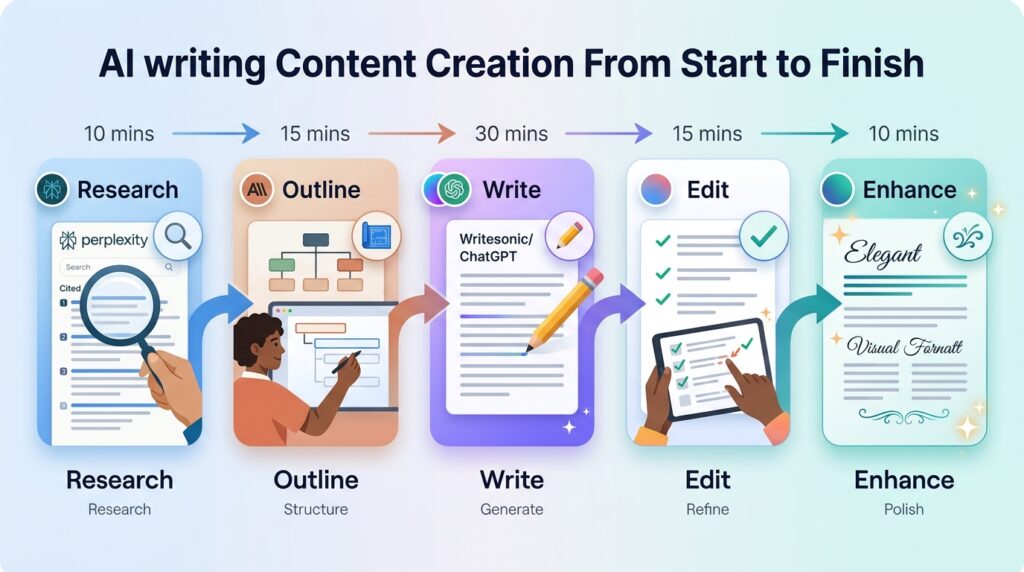
Rather than choosing a single tool, power users often create workflows combining multiple AI assistants:
Content Creation Workflow:
1. Research phase → Use Perplexity for cited information
2. Outlining → Use Claude for structure and organization
3. Writing → Use Writesonic for marketing copy or Claude for detailed prose
4. Editing → Use Gemini for tone and style refinement
5. Fact-checking → Return to Perplexity for verification
Browser Extensions & Integrations
Many AI tools offer browser extensions and integrations:
- Gmail/Outlook integration: Copilot, Chatsonic
- Google Docs integration: Gemini, some custom plugins
- Chrome extensions: ChatGPT, Copilot, various others
- Zapier/Make: Most major tools support automation workflows
Building Custom Workflows
For power users, consider:
- API access: Claude, OpenAI, Gemini all offer APIs
- Custom chatbots: Chatsonic, Meta AI allow customization
- Content automation: Integrate with your CMS via webhooks
- Quality control gates: Set up human review processes before publishing
Common Mistakes to Avoid
Mistake 1: Over-Relying on AI Without Fact-Checking
Issue: AI tools occasionally generate plausible-sounding but inaccurate information (“hallucinations”).
Solution: Always verify facts with tools like Perplexity that provide citations. Cross-reference important information with original sources.
Mistake 2: Using Generic Prompts
Issue: Vague prompts produce generic outputs that don’t stand out.
Solution: Provide specific context, desired length, tone, and any constraints. Include examples of your preferred style.
Mistake 3: Publishing Without Personalization
Issue: AI-generated content lacks personal voice and unique perspective.
Solution: Use AI as a starting point. Add your experiences, opinions, and unique insights. Your human touch makes content valuable.
Mistake 4: Ignoring Copyright Concerns
Issue: AI tools are trained on internet content, raising copyright questions.
Solution: Always review output and add original analysis. Cite sources. Consider using tools with built-in citation features (Perplexity).
Mistake 5: Choosing Wrong Tool for Task
Issue: Using a marketing-focused tool for academic writing wastes potential.
Solution: Match tools to use cases as recommended in this guide. Specialized tools outperform generalists in their domains.
Mistake 6: Not Utilizing Free Tiers Fully
Issue: Paying for premium when free options meet your needs.
Solution: Test free tiers thoroughly. Many users never need premium features. Only upgrade when free limits genuinely restrict your work.
Future of AI Writing Tools in 2025-2026
Emerging Trends
1. Specialization Over Generalization
The future belongs to AI tools optimized for specific use cases rather than one-size-fits-all solutions. Expect specialized tools for technical writing, medical content, legal documents, and niche industries.
2. Multimodal Capabilities
AI writing tools increasingly incorporate image generation, video scripting, and audio synthesis alongside text. The distinction between “writing” and “content creation” tools continues to blur.
3. Real-Time Collaboration
Future tools will emphasize team collaboration features—simultaneous editing, feedback loops, and version control integrated directly into AI assistants.
4. Privacy & Open-Source Growth
As concerns about data privacy grow, open-source AI models like Meta’s Llama will gain adoption among organizations wanting to run AI locally without cloud dependencies.
5. Semantic SEO Integration
AI writing tools are embedding SEO intelligence directly, moving beyond keyword optimization toward genuine semantic understanding of search intent and E-E-A-T principles.
Conclusion
The landscape of free AI writing tools like ChatGPT has become remarkably competitive in 2025-2026. Rather than seeking a single “best” tool, successful users build workflows combining specialized tools for different stages of content creation.
For maximum results:
- Start with tools matching your primary use case
- Test free tiers extensively before considering paid options
- Combine complementary tools (research + writing + editing)
- Always fact-check output and add personal insights
- Stay updated as these tools evolve rapidly
The democratization of AI writing capabilities means professional-quality content is now accessible to individuals and small businesses that previously couldn’t afford such resources. The competitive advantage belongs to those who master these tools effectively.
Additional Resources
Official Tool Websites
- Claude by Anthropic
- Google Gemini
- Perplexity AI
- Microsoft Copilot
- Writesonic
- Chatsonic
- Character.AI
- Meta AI
- DeepSeek
- Pi by Inflection
Research & Learning
FAQs About Free AI Writing Tools
Is using AI-generated content against Google’s policies?
Google doesn’t penalize AI-generated content inherently. What matters is quality, accuracy, and human oversight. AI can support E-E-A-T principles if properly fact-checked and combined with human expertise.
Resource: Google’s Guidelines on AI Content provide official clarification.
Can I use AI tools for commercial purposes with free versions?
Most free tiers permit commercial use, but check individual terms. Writesonic, Chatsonic, and Claude explicitly allow commercial use in free tiers. Always verify current terms of service.
What’s the difference between ChatGPT free and paid versions?
Free ChatGPT uses GPT-3.5 with usage limits (3 requests per 3 hours). Paid ChatGPT Plus ($20/month) offers GPT-4, higher limits, plugins, custom instructions, and priority access.
How do I ensure AI writing matches my brand voice?
Provide style guides and examples in prompts. Many tools (Writesonic, Copilot, Claude) support system prompts defining brand voice. Test outputs and refine prompts iteratively.
Which tool is best for non-English languages?
Meta AI offers excellent multilingual support with 100+ languages. Gemini and Claude also perform well. Perplexity excels in research across languages.