
Table of Contents
Final Tips for Using Stylish Discord Text
What Are Discord Fonts?
How Discord Fonts Work
Discord Username vs. Display Name
How to Create Stylish Discord Text
Discord Fonts You Can Copy and Paste
Best Discord Font Styles for Names
Stylish Discord Nickname Ideas
Discord Bio and About Me Fonts
Discord Fonts for Gaming Profiles
How to Use Unicode Fonts on Discord
Discord Fonts That Work on Mobile
Discord Display Name Styles
Discord Fonts vs. Discord Display Name Styles
Best Discord Font Generators
CursiveTextGenerator.net for Discord Fonts
Discord Fonts Comparison Table
Common Problems With Discord Fonts
How to Fix Discord Font Display Issues
Tips for Choosing a Readable Discord Font
Creative Discord Font Examples
Frequently Asked Questions About Discord Fonts
Want to make your Discord profile look more creative? You can use Discord fonts to create stylish names, nicknames, bios, status text, and messages that stand out.
Most online Discord font generators do not install a new font on your computer. Instead, they convert normal letters into special Unicode characters that look bold, cursive, Gothic, small, circled, or decorative. You can then copy the result and paste it into places on Discord that accept those characters. LingoJam, for example, explains that its Discord generator creates styles using Unicode characters rather than installing traditional fonts.
There is one important detail to understand first: Discord’s unique @username is different from your display name. Discord’s current usernames are limited to lowercase Latin letters, numbers, periods, and underscores. Display names are much more flexible and can include special characters, spaces, emojis, and non-Latin characters. Instagram Font Generator
That means a Discord font generator is especially useful for your display name, server nickname, About Me, and messages, rather than trying to replace the actual unique @username.
In this guide, you will learn how Discord fonts work, how to make them, where you can use them, which styles are useful, how to copy and paste them, and how CursiveTextGenerator.net compares with other text-generation tools.
What Are Discord Fonts?
Discord fonts are usually Unicode text styles rather than traditional font files.
A normal word such as:
Shadow
can be transformed into different Unicode styles such as:
- 𝓢𝓱𝓪𝓭𝓸𝔀
- 𝕾𝖍𝖆𝖉𝖔𝖜
- 𝐒𝐡𝐚𝐝𝐨𝐰
- 𝘚𝘩𝘢𝘥𝘰𝘸
- 𝚂𝚑𝚊𝚍𝚘𝚠
- Ⓢⓗⓐⓓⓞⓦ
- Sʜᴀᴅᴏᴡ
These are not the same as installing a font such as Arial or Times New Roman. The characters themselves are different Unicode characters.
This is why you can usually copy them from a website and paste them into another text field without installing anything.
LingoJam describes its Discord generator as producing styles such as Gothic, cursive, double-struck, and small text through Unicode characters.
Why Do People Use Stylish Fonts on Discord?
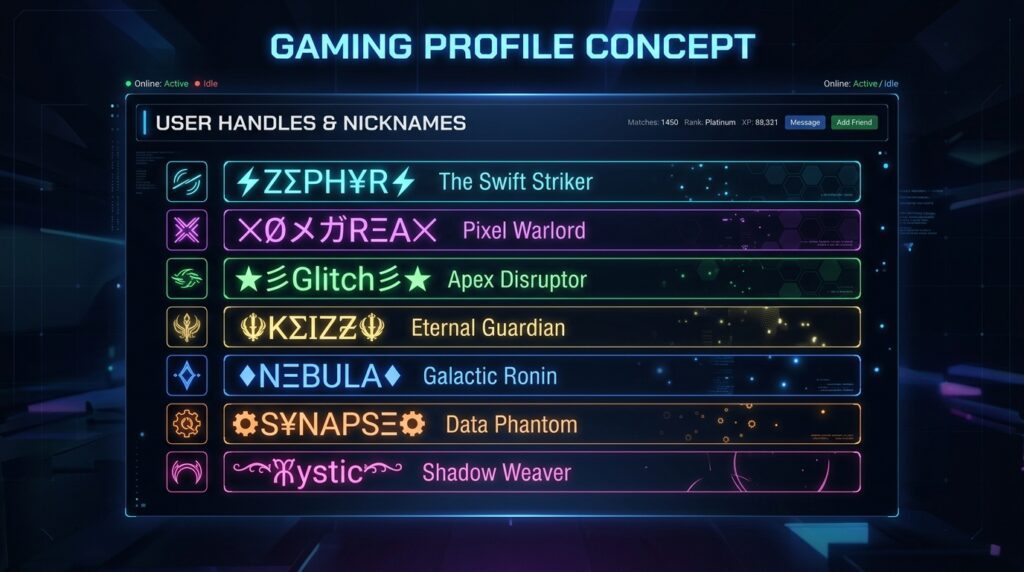
Discord already provides built-in text formatting such as bold and italic Markdown.
Unicode text is different because the characters themselves are changed.
This can be useful when you want to create:
- A decorative display name
- A stylish server nickname
- A gaming identity
- An About Me description
- A custom profile style
- A memorable message
- A themed roleplay name
- A cute or aesthetic profile
- A Gothic or gaming-style nickname
However, stylish text should be used carefully. Some decorative characters can be difficult to read, and unusual Unicode characters may not display identically on every device.
For important information, simple text is usually easier to understand.
Discord Username vs. Display Name
This is one of the most important things to understand before using a Discord font generator.
Your unique Discord username
Discord’s current username system uses a unique username to identify your account.
Discord says new usernames:
- Must be between 2 and 32 characters
- Are forced to lowercase
- Can contain Latin letters
- Can contain numbers
- Can contain underscores
- Can contain periods
- Cannot contain other special characters
- Must be unique
So you generally cannot take something like:
𝓐𝔀𝓪𝓲𝓼
and use it as your unique @username.
If the username you want is already taken, Discord says you can use numbers, underscores, and periods to create another available username.
Your Discord display name
Your display name is much more flexible.
Discord says display names can include:
- Uppercase letters
- Lowercase letters
- Special characters
- Spaces
- Emojis
- Non-Latin characters
Display names can also be changed separately from your unique username. Discord currently allows display names to be between 1 and 32 characters, subject to its Community Guidelines.
So if you want to use stylish Unicode text, your display name is usually the place to try it.
For example:
Normal display name:
Awais
Stylish display name:
𝓐𝔀𝓪𝓲𝓼
Or:
𝔄𝔴𝔞𝔦𝔰
Or:
𝐀𝐰𝐚𝐢𝐬
Discord Display Name Styles vs. Unicode Fonts
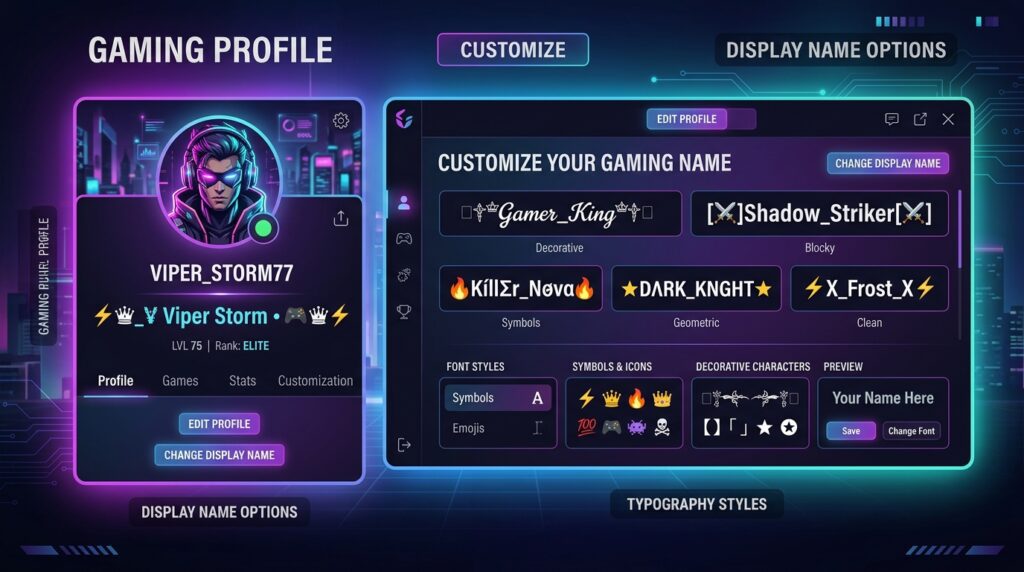
Discord now also has a native Display Name Styles feature for Nitro users.
Discord says Display Name Styles lets Nitro users customize how their display name appears using different fonts, colors, and animated effects. Users without Nitro can preview these styles but cannot save them to their profiles.
This is different from a Unicode font generator.
Native Discord styling
Discord’s own Display Name Styles feature changes the visual presentation of your display name inside Discord.
Unicode styling
A Unicode generator changes the actual characters.
For example:
Hello
can become:
𝓗𝓮𝓵𝓵𝓸
The second version contains different Unicode characters that can be copied as text.
So you can think of them as two different approaches:
| Method | How it works |
|---|---|
| Discord Display Name Styles | Native Discord styling |
| Unicode generator | Converts normal letters into Unicode characters |
| Traditional font file | Changes how characters are rendered by software |
Discord also notes that some symbols may not display as expected with its custom display-name fonts and can fall back to the standard Discord font.
How to Make Discord Fonts
Creating stylish Discord text is simple.
Step 1: Choose your text
Start with the word, nickname, phrase, or short profile text you want to style.
For example:
Night Hunter
Step 2: Open a Discord font generator
You can use a Unicode text generator such as CursiveTextGenerator.net.
Step 3: Enter your text
Type or paste your normal text into the generator.
For example:
Night Hunter
Step 4: Browse the styles
The generator can show different Unicode variations.
You might find:
- Cursive
- Bold
- Italic
- Gothic
- Circled
- Monospace
- Small text
- Decorative styles
Step 5: Pick a readable style
Do not automatically choose the most complicated style.
If your friends cannot easily read your name, the style may not be useful.
Step 6: Copy the result
Use the copy option provided by the generator.
Step 7: Paste it into Discord
Paste it into the appropriate Discord field, such as a display name, nickname, or message.
Discord Font Examples
Here are some simple examples you can experiment with.
| Style | Example |
|---|---|
| Normal | Shadow |
| Cursive | 𝓢𝓱𝓪𝓭𝓸𝔀 |
| Bold | 𝐒𝐡𝐚𝐝𝐨𝐰 |
| Italic | 𝘚𝘩𝘢𝘥𝘰𝘸 |
| Gothic | 𝕾𝖍𝖆𝖉𝖔𝖜 |
| Double Struck | 𝕊𝕙𝕒𝕕𝕠𝕨 |
| Monospace | 𝚂𝚑𝚊𝚍𝚘𝚠 |
| Circled | Ⓢⓗⓐⓓⓞⓦ |
| Small Caps | Sʜᴀᴅᴏᴡ |
Not every style is equally suitable for every Discord field. Test the result before making it part of your profile.
Best Discord Font Styles for Different Uses
Different styles create different visual effects.
1. Cursive Discord Fonts
Example:
𝓢𝓽𝔂𝓵𝓲𝓼𝓱 𝓝𝓪𝓶𝓮
Cursive can suit:
- Personal profiles
- Aesthetic servers
- Friendly communities
- Social profiles
- Soft or elegant themes
It gives text a handwritten appearance.
2. Gothic Discord Fonts
Example:
𝕯𝖆𝖗𝖐 𝕶𝖓𝖎𝖌𝖍𝖙
Gothic or Fraktur styles can suit:
- Gaming communities
- Fantasy servers
- Horror communities
- Roleplay servers
- Dark-themed profiles
The main drawback is readability. Some Gothic characters can be difficult to recognize quickly.
3. Bold Discord Fonts
Example:
𝐆𝐀𝐌𝐄𝐑
Bold Unicode styles are useful when you want a strong visual appearance without using many symbols.
They can work well for:
- Short nicknames
- Profile text
- Gaming profiles
- Decorative headings
4. Small Text
Example:
ˢᵐᵃˡˡ ᵗᵉˣᵗ
Small Unicode characters can be useful for decorative profile text.
LingoJam’s Discord generator includes small-text styles among its Unicode options.
5. Double-Struck Text
Example:
𝔻𝕚𝕤𝕔𝕠𝕣𝕕
This style has a distinctive mathematical appearance.
It can work well for:
- Tech communities
- Coding servers
- Gaming profiles
- Short names
- Decorative headings
6. Circled and Enclosed Text
Example:
Ⓓⓘⓢⓒⓞⓡⓓ
Enclosed letters create a playful visual effect.
They are better for short text because long sentences can become difficult to scan.
Where Can You Use Discord Fonts?
Unicode text can be useful in several parts of Discord, but the exact rules depend on the field.
Display Names
This is one of the main places to use stylish text.
Discord allows display names to contain special characters, emojis, spaces, and non-Latin characters, within its rules.
Example:
𝓐𝔀𝓪𝓲𝓼
Server Nicknames
Server nicknames provide another way to personalize how your name appears inside a particular community.
Discord says server nicknames take priority over your display name when one is set.
About Me
You can use decorative text in profile descriptions where supported.
For example:
🎮 𝓖𝓪𝓶𝓮𝓻 | 🎵 𝓜𝓾𝓼𝓲𝓬 𝓛𝓸𝓿𝓮𝓻
Messages
Unicode text can be pasted into Discord messages like other text.
For ordinary emphasis, however, Discord’s built-in Markdown may be easier to read.
How to Make a Stylish Discord Name
If your goal is specifically a stylish display name, follow this process.
Step 1: Start with a short name
Short names are easier to style.
Examples:
- Shadow
- Awais
- Ghost
- Nova
- Blaze
- Luna
- Hunter
- Phoenix
Step 2: Try several font styles
Generate multiple versions.
For example:
Ghost
𝓖𝓱𝓸𝓼𝓽
𝔊𝔥𝔬𝔰𝔱
𝐆𝐡𝐨𝐬𝐭
𝙂𝙝𝙤𝙨𝙩
𝔾𝕙𝕠𝕤𝕥
Step 3: Check readability
Ask yourself:
- Can I read it quickly?
- Can my friends recognize it?
- Does it fit my profile?
- Does it display correctly?
- Is it too complicated?
Step 4: Keep a backup
Save the plain version somewhere.
If a Unicode style does not display properly, you can switch back to normal text.
Stylish Discord Name Ideas
Here are some examples you can customize.
Gaming
- 𝕯𝖆𝖗𝖐 𝕳𝖚𝖓𝖙𝖊𝖗
- 𝐁𝐥𝐚𝐳𝐞
- 𝕾𝖍𝖆𝖉𝖔𝖜
- 𝓥𝓲𝓹𝓮𝓻
- 𝙂𝙝𝙤𝙨𝙩
Aesthetic
- 𝓛𝓾𝓷𝓪
- 𝒟𝓇𝑒𝒶𝓂𝑒𝓇
- 𝓢𝓸𝓾𝓵
- 𝓜𝓸𝓸𝓷
- 𝒜𝓊𝓇𝑜𝓇𝒶
Cute
- 𝓑𝓾𝓷𝓷𝔂 ♡
- 𝓛𝓲𝓵𝔂 🌸
- 𝓢𝓽𝓪𝓻𝔂 ✨
- 𝓢𝔀𝓮𝓮𝓽 ♡
- 𝓒𝓾𝓽𝓲𝓮 🎀
Dark
- 𝕯𝖆𝖗𝖐 𝕾𝖔𝖚𝖑
- 𝕹𝖎𝖌𝖍𝖙𝖒𝖆𝖗𝖊
- 𝕻𝖍𝖆𝖓𝖙𝖔𝖒
- 𝕽𝖆𝖛𝖊𝖓
- 𝕭𝖑𝖆𝖈𝖐 𝕾𝖙𝖆𝖗
Discord Fonts and Unicode: How Do They Actually Work?
The word “font” can be confusing here.
When you select Arial in a word processor, you are changing the visual typeface used to display the same underlying letters.
Unicode generators work differently.
The ordinary letter:
A
and a mathematical or decorative Unicode character that looks like a stylized A can be completely different code points.
The generator essentially maps one character set to another.
That is why you can copy:
𝓐𝓫𝓬
and paste it into a text field without installing a .ttf or .otf font.
LingoJam explains that many of its fancy Discord styles are Unicode characters and includes styles such as cursive, Gothic, double-struck, and small text.
Are Discord Fonts Supported on Every Device?
Not necessarily.
Unicode provides a common standard for text, but a device or application still needs an appropriate glyph to display a particular character.
That means:
𝓗𝓮𝓵𝓵𝓸
may display correctly for most modern users, while a more unusual Unicode character could appear as a square or missing glyph.
LingoJam notes that some Unicode characters can appear as boxes or question marks on older devices.
For important information, plain text is usually the safer option.
This is also important for accessibility. Decorative Unicode can sometimes be harder to interpret, so profile information that people genuinely need to understand should not rely entirely on fancy characters.
Discord Fonts vs. Discord Markdown
These are not the same thing.
| Feature | Unicode Fonts | Discord Markdown |
|---|---|---|
| Changes characters | Yes | No |
| Requires font installation | No | No |
| Can create cursive-looking letters | Yes | No |
| Can create Gothic-looking letters | Yes | No |
| Bold formatting | Yes | Yes |
| Italic formatting | Yes | Yes |
| Easy to read | Depends on style | Usually |
| Useful for display names | Often | Different purpose |
| Works as copied text | Yes | Discord interprets the formatting |
If you simply want emphasis in a sentence, Markdown is often enough.
If you want your display name or nickname to have a different visual character style, Unicode text may be more appropriate.
CursiveTextGenerator.net vs. Other Discord Font Tools
There are many websites that can generate Unicode text. The right option depends on the styles and workflow you need.
| Tool | Main Purpose | Styles/Options | Copy & Paste | Ease of Use | Mobile Use | Extra Features |
|---|---|---|---|---|---|---|
| CursiveTextGenerator.net | Cursive and stylish Unicode text | Cursive, bold, Gothic, circled, monospace and other styles | Yes | Simple browser-based interface | Yes | General stylish-text tools |
| LingoJam Discord Fonts | Discord-focused fancy Unicode text | Cursive, Gothic, double-struck, small text and more | Yes | Simple converter | Yes | Dedicated Discord font page |
| YayText | General social-media fancy text | Cursive, bold, italic and decorative styles | Yes | Click-to-copy interface | Yes | Multiple platform-oriented tools |
| FancyFonts Discord Fonts | Discord names, bios and status text | Bold, italic, cursive, small, weird and glitch categories | Yes | Style filtering | Yes | Favorites, recent styles and large style library |
| FancyText | Discord names and messages | Fraktur, bold, double-struck, monospace, fullwidth and small caps | Yes | Simple generator | Yes | Image export and style preview |
| LingoJam Fancy Text | General fancy Unicode text | Many decorative Unicode styles | Yes | Live converter | Yes | Multiple styles and community-created generators |
LingoJam’s dedicated Discord page provides copy-and-paste Unicode styles including Gothic, cursive, double-struck, and small text.
FancyFonts currently provides Discord-specific categories including stylish, bold, italic, cursive, small, weird, and glitch styles.
FancyText provides Discord-oriented Unicode styles such as Fraktur, bold, double-struck, monospace, fullwidth, and small caps.
Which tool should you use?
There is no single tool that has to be right for everyone.
If you want a Discord-specific generator, a dedicated Discord page can make the process easier.
If you want a broader stylish-text workflow that can also be used for Instagram, WhatsApp, gaming names, bios, and other platforms, a general generator can be more convenient.
Why Try CursiveTextGenerator.net for Discord Fonts?
CursiveTextGenerator.net is designed around copy-and-paste stylish text rather than requiring users to install traditional font files.
The site provides multiple generated styles, including categories such as cursive, bold, Gothic, circled, and monospace.
For a Discord user, that makes the site useful when you want to:
- Quickly generate a stylish display name
- Try several Unicode styles
- Create a gaming nickname
- Make decorative profile text
- Generate text for Discord messages
- Reuse the same style on other social platforms
- Copy text directly from a browser
You can start with the CursiveTextGenerator.net Cursive Text Generator.
The important point is to use the generator for the right Discord field. A Unicode generator does not bypass Discord’s restrictions on the unique username. Discord’s current rules allow much more character flexibility in display names than in unique usernames.
Tips for Choosing a Good Discord Font
Keep important information readable
A beautiful style is not useful if nobody can understand it.
For example, this may be easier to read:
𝐆𝐚𝐦𝐞𝐫
than a highly decorated version surrounded by many symbols.
Use one main style
Mixing many different Unicode alphabets in one name can make it look messy.
Try one primary style and perhaps one or two symbols.
Keep names short
Short names are easier to recognize.
Instead of:
꧁༺🔥𝕿𝖍𝖊 𝕯𝖆𝖗𝖐 𝕹𝖎𝖌𝖍𝖙 𝕶𝖎𝖓𝖌🔥༻꧂
you might use:
𝕯𝖆𝖗𝖐 𝕶𝖎𝖓𝖌
Test before saving
Paste your chosen text into Discord and check how it appears.
Keep the normal version
If a particular Unicode style causes problems, you can quickly return to the plain version.
Think about accessibility
If your About Me contains important information, consider keeping that information in standard text and using decorative characters only for a short heading or name.
Common Problems With Discord Fonts
“My fancy username won’t work”
You may be trying to paste Unicode into Discord’s unique username field.
Discord’s current usernames only allow lowercase Latin characters, numbers, periods, and underscores.
Try your styled text in the display-name field instead.
“My font appears as boxes”
The receiving device may not have a suitable glyph for that Unicode character.
Try a simpler style.
“The name is difficult to read”
Choose a simpler font.
Cursive, bold, or small caps can be easier to recognize than extremely decorative combinations.
“Discord changes how my name looks”
Discord has its own display-name styling system as well as Unicode text.
Its current Display Name Styles feature can apply fonts, colors, and effects to display names for Nitro users.
“My server nickname looks different”
A server nickname can override the general display name inside that server. Discord confirms that server nicknames take priority over display names where they are set.
Step-by-Step: Create a Discord Font With CursiveTextGenerator.net
Here is a simple workflow:
- Open CursiveTextGenerator.net.
- Enter your name or text.
- Review the generated Unicode styles.
- Find a style that is readable.
- Copy the result.
- Open Discord.
- Go to your profile settings.
- Choose the appropriate display-name or profile field.
- Paste the text.
- Save your changes.
- Check the result on desktop and mobile if possible.
Remember that Discord’s interface can change over time, so use the current labels shown in your Discord app.
Discord Font Ideas for Gamers
Gamers often prefer short names that are easy to recognize.
Warrior style
⚔️ 𝕎𝕒𝕣𝕣𝕚𝕠𝕣
Shadow style
𝕾𝖍𝖆𝖉𝖔𝖜
Royal style
♛ 𝓚𝓲𝓷𝓰
Cyber style
𝙲𝚢𝚋𝚎𝚛
Simple competitive style
𝐏𝐑𝐎
Aesthetic gamer style
𝓛𝓾𝓷𝓪 ✦
The key is not to add as many symbols as possible. A short readable name often works better than a complicated combination.
Discord Fonts for Servers
Unicode styling can also be useful for server branding where the particular field accepts the characters.
For example:
Normal:
Gaming Lounge
Stylized:
𝓖𝓪𝓶𝓲𝓷𝓰 𝓛𝓸𝓾𝓷𝓰𝓮
Or:
『Gaming Lounge』
Or:
⚡ 𝐆𝐚𝐦𝐢𝐧𝐠 𝐋𝐨𝐮𝐧𝐠𝐞 ⚡
Always test the exact field because Discord’s rules are not identical for usernames, display names, server names, channels, roles, and messages.
Discord Fonts on Mobile
You do not need a desktop computer to generate Unicode text.
The basic process on a phone is:
- Open your browser.
- Visit a Discord font generator.
- Type your text.
- Select a style.
- Tap Copy.
- Open Discord.
- Paste the result.
CursiveTextGenerator.net is browser-based, so you can use it without installing a dedicated font generator.
If a particular style looks strange on your phone, choose another Unicode style.
Are Discord Fonts Free?
Many online Unicode generators are available without payment.
CursiveTextGenerator.net provides its main text-generation tool for copy-and-paste use without requiring users to install traditional font files.
Other tools have different features and business models, so check the individual website before assuming every feature is free.
Discord’s native Display Name Styles feature is different: Discord currently lists it as a Nitro feature.
Final Thoughts
Discord fonts are a simple way to experiment with the appearance of your display name, nickname, profile text, and messages.
The most important thing is understanding the difference between Unicode text and Discord’s actual username system. A fancy Unicode name should not be confused with the unique @username, which has much stricter character rules. Discord currently allows considerably more flexibility in display names, including special characters and emojis.
For creating Unicode styles, CursiveTextGenerator.net gives you a straightforward place to enter text, explore different styles, and copy the result.
Whether you prefer a clean bold name, an elegant cursive nickname, a Gothic gaming identity, or a simple decorative profile, start with readability and then add style.
A good Discord font should make your profile feel more personal—not make your name impossible to read.
Frequently Asked Questions
1. What are Discord fonts?
Discord fonts are usually stylized Unicode characters that look like different fonts. They can be copied and pasted into Discord fields that accept those characters.
2. Can I use fancy fonts in my Discord username?
Not in the current unique username field. Discord restricts new usernames to lowercase Latin characters, numbers, periods, and underscores.
3. Can I use stylish fonts in my Discord display name?
Yes. Discord says display names can include special characters, spaces, emojis, and non-Latin characters, subject to its rules.
4. Do I need Discord Nitro to use Unicode fonts?
No. Unicode characters can be copied and pasted without Nitro. However, Discord’s separate native Display Name Styles feature is currently a Nitro feature.
5. How do I create a stylish Discord name?
Enter your name into a Unicode font generator, select a style, copy the result, and paste it into the appropriate Discord display-name or nickname field.
6. What is the difference between a Discord username and display name?
The username is your unique account identifier and has strict character rules. The display name is the prominent name other users see and allows a much wider range of characters.
7. Can I use cursive text on Discord?
Yes, cursive Unicode characters can be copied and pasted into Discord fields that accept them.
8. Can I use Gothic fonts on Discord?
Yes. Gothic or Fraktur Unicode styles can be used where Discord accepts those characters.
9. Why does my Discord font show as a square?
The device or application may not have a glyph for that particular Unicode character. Try a simpler or more common Unicode style.
10. Can I use emoji with Discord fonts?
Yes. You can combine Unicode-styled text with emoji where the Discord field accepts both.
11. Can I use Discord fonts on my phone?
Yes. You can generate and copy Unicode text from a mobile browser and paste it into Discord.
12. Are Discord font generators actually changing the font?
Usually, no. Most generators change the characters themselves by mapping normal text to different Unicode characters.
13. Can I use fancy fonts in Discord messages?
Yes, Unicode-styled characters can be pasted into messages. For simple bold or italic formatting, Discord’s normal Markdown options may be easier.
14. Can I use stylish text in my Discord About Me?
Unicode text can be used in profile fields that accept those characters. Keep important information readable.
15. Can I use Unicode text in a Discord server nickname?
Server nicknames can be customized separately from your general display name. The exact characters accepted can depend on Discord’s current rules and the relevant field.
16. Can I create a Discord name with symbols?
Yes, symbols can be used in display names subject to Discord’s rules. Unique usernames have much stricter character restrictions.
17. What is the best Discord font style?
There is no single style that works for everyone. Choose based on your purpose. Cursive can suit aesthetic profiles, bold can be easier to read, and Gothic can suit gaming or dark themes.
18. Why is my fancy Discord name hard to read?
Some Unicode characters are visually unusual. Try a simpler style and avoid using too many decorative symbols.
19. Can I copy Discord fonts from one device to another?
Usually, yes. Unicode text is ordinary text data, so you can copy and paste it between compatible applications and devices.
20. Is CursiveTextGenerator.net useful for Discord fonts?
It can be used to create copy-and-paste stylish Unicode text that you can test in Discord and other platforms.
21. Do Discord fonts work on every phone?
Most common Unicode styles work on modern devices, but unusual characters may not render correctly everywhere.
22. Can I use fancy fonts for a gaming Discord server?
Yes. Unicode styles can be useful for display names, nicknames, server branding, and decorative text where the relevant field supports them.
23. Should I use fancy fonts for every Discord message?
Usually, keeping important messages in standard text makes them easier to read. Decorative Unicode works better as an occasional design element.
24. Can I make my Discord display name look Gothic?
Yes. A Unicode generator can create Gothic or Fraktur-style characters that you can copy into a compatible Discord display-name field.
25. Can I create Discord fonts without downloading an app?
Yes. Browser-based Unicode generators can create copy-and-paste text without requiring a font installation or dedicated generator app.