
Want to make your Discord name, nickname, bio, server, or profile text look more unique?
A Discord font generator can turn ordinary words into stylish Unicode text that you can copy and paste into supported Discord fields. You can create bold, cursive, Gothic, small-cap, monospace, bubble, aesthetic, and other decorative text styles without downloading a traditional font file.
For example:
Normal:
Discord Gamer
Bold:
𝗗𝗶𝘀𝗰𝗼𝗿𝗱 𝗚𝗮𝗺𝗲𝗿
Cursive:
𝓓𝓲𝓼𝓬𝓸𝓻𝓭 𝓖𝓪𝓶𝓮𝓻
Gothic:
𝔇𝔦𝔰𝔠𝔬𝔯𝔡 𝔊𝔞𝔪𝔢𝔯
Small Caps:
ᴅɪꜱᴄᴏʀᴅ ɢᴀᴍᴇʀ
The important part is that these are generally Unicode characters, not custom font files. That is why you can copy the generated result and paste it into another application.
In this guide, you will learn how Discord fonts work, how to generate them, where you can use them, which styles are useful for different purposes, and how CursiveTextGenerator.net compares with other Discord font tools.
What Is a Discord Font Generator?
A Discord font generator is an online tool that changes normal text into different Unicode-based styles.
You enter a word or phrase, and the tool creates multiple versions.
For example:
Original:
Night Warrior
Bold:
𝗡𝗶𝗴𝗵𝘁 𝗪𝗮𝗿𝗿𝗶𝗼𝗿
Cursive:
𝓝𝓲𝓰𝓱𝓽 𝓦𝓪𝓻𝓻𝓲𝓸𝓻
Gothic:
𝔑𝔦𝔤𝔥𝔱 𝔚𝔞𝔯𝔯𝔦𝔬𝔯
Double Struck:
ℕ𝕚𝕘𝕙𝕥 𝕎𝕒𝕣𝕣𝕚𝕠𝕣
You can then copy the version you like.
Many Discord font generators are designed specifically around this copy-and-paste process. Current tools commonly provide styles such as bold, cursive, Gothic, monospace, small text, bubble, and decorative Unicode characters.
How Does Discord Font Text Work?
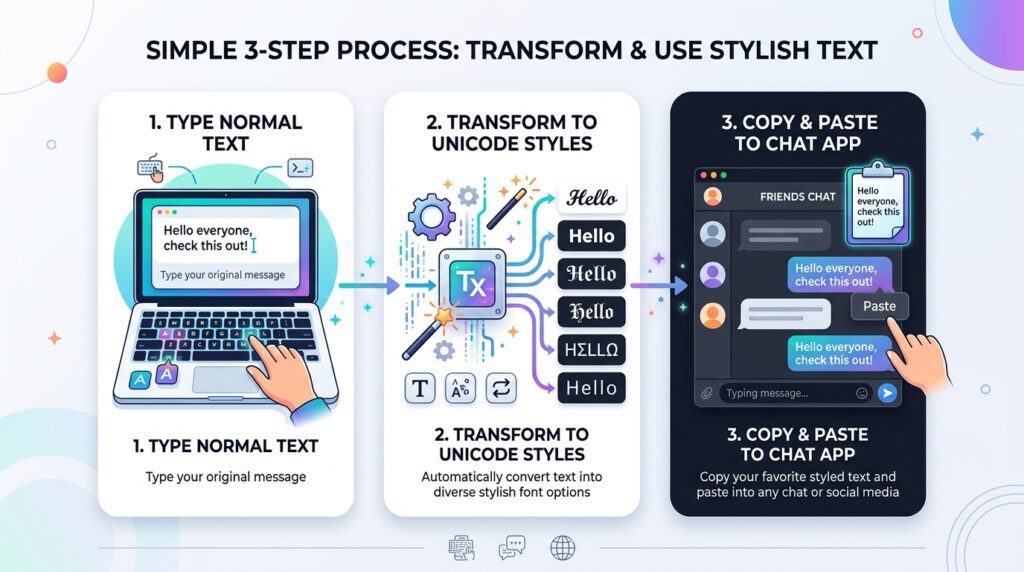
The word “font” can be confusing.
A traditional font changes the visual appearance of ordinary letters. For example, the letter A is still the same letter whether you display it in Arial, Times New Roman, or another typeface.
Unicode styling works differently.
A generator can replace:
Hello
with:
𝓗𝓮𝓵𝓵𝓸
The second version contains different Unicode characters.
This means you are not actually installing a new font inside Discord. You are copying characters that already exist in the Unicode standard.
That is why these styles can be copied between websites and applications without installing a font file. Several current Discord font tools describe their output in exactly this way: Unicode characters are substituted for normal letters to create the visual effect.
This also explains why compatibility can vary. Different Unicode characters may be supported differently by operating systems, applications, and devices.
How to Use a Discord Font Generator
Creating stylish Discord text only takes a few steps.
Step 1: Choose Your Text
Think about what you want to style.
You could enter:
- Your display name
- A gaming nickname
- A server name
- A short bio
- A channel label
- A role name
- A short status
- A welcome message
For example:
Shadow Gamer
Step 2: Enter the Text
Open a Discord font generator and type or paste your words into the input box.
Step 3: Browse the Styles
The generator will normally produce several versions of your text.
Look for a style that is:
- Easy to read
- Suitable for your profile
- Supported by your device
- Appropriate for the Discord field you are using
Step 4: Copy the Result
Click or tap the copy button next to the style you want.
Step 5: Paste It Into Discord
Open Discord and paste the text into the appropriate field.
Step 6: Check the Result
Before saving an important name or profile, make sure every character looks correct.
If you see missing-character boxes or strange spacing, try a simpler style.
Popular Discord Font Styles
Different Unicode styles create different moods. Here are some of the most useful options.
1. Bold Discord Fonts
Example:
Normal:
Gaming Zone
Bold:
𝗚𝗮𝗺𝗶𝗻𝗴 𝗭𝗼𝗻𝗲
Bold text is simple and easy to read.
It can work well for:
- Short names
- Headings
- Server labels
- Announcements
- Profile text
If you want something stylish without making the text difficult to understand, bold is a good starting point.
2. Cursive Discord Fonts
Example:
Normal:
Dream Chaser
Cursive:
𝓓𝓻𝓮𝓪𝓶 𝓒𝓱𝓪𝓼𝓮𝓻
Cursive styles have a handwritten or elegant appearance.
They can work well for:
- Personal profiles
- Bios
- Aesthetic servers
- Music communities
- Creative usernames
For longer text, however, simple text may be easier to read.
3. Gothic Discord Fonts
Example:
Normal:
Dark Knight
Gothic:
𝔇𝔞𝔯𝔨 𝔎𝔫𝔦𝔤𝔥𝔱
Gothic or Fraktur styles are often used for darker gaming themes, fantasy communities, role-playing servers, and similar designs.
Because some Gothic characters can be harder to recognize, test the result before using it as an important name.
4. Small Caps Discord Fonts
Example:
Normal:
Gaming Master
Small Caps:
ɢᴀᴍɪɴɢ ᴍᴀꜱᴛᴇʀ
Small-cap styles create a compact appearance.
They are useful when you want something different from bold or cursive but still want the text to remain relatively clean.
5. Monospace Discord Fonts
Example:
Normal:
Code Zone
Monospace:
𝙲𝚘𝚍𝚎 𝚉𝚘𝚗𝚎
Monospace text can suit:
- Programming communities
- Developer servers
- Technology profiles
- Coding channels
- Tech-themed names
6. Bubble Text
Example:
ⓖⓐⓜⓘⓝⓖ ⓩⓞⓝⓔ
Bubble-style characters are more playful and can work for casual communities.
They are particularly useful for short names because longer text can become visually busy.
7. Double-Struck Text
Example:
𝔾𝕒𝕞𝕚𝕟𝕘 ℤ𝕠𝕟𝕖
This style gives text a mathematical or outlined appearance.
It can be useful when you want something different without adding many symbols around the words.
8. Decorative Text
You can also combine normal or Unicode-styled text with symbols.
Examples:
✦ 𝗚𝗮𝗺𝗶𝗻𝗴 𝗭𝗼𝗻𝗲 ✦
『𝓓𝓻𝓮𝓪𝓶𝓮𝓻』
⚔️ 𝔇𝔞𝔯𝔨 𝔎𝔫𝔦𝔤𝔥𝔱 ⚔️
Use decorative symbols carefully. Too many symbols can make a name harder to read.
Where Can You Use Discord Fonts?
Unicode text can be useful in several parts of Discord, although the exact characters accepted can depend on the specific field.
Discord Display Names
A stylish display name is one of the most common reasons people search for Discord fonts.
For example:
𝓐𝔀𝓪𝓲𝓼
or:
𝗚𝗮𝗺𝗲𝗿 𝗕𝗼𝘆
Remember that a Discord display name is not the same thing as your account username. Discord’s username system has different character restrictions, so you should not assume that every fancy Unicode style will work in every identity field.
Server Nicknames
Server nicknames can be styled differently for different communities.
For example:
ᴘʀᴏ ɢᴀᴍᴇʀ
or:
𝕾𝖍𝖆𝖉𝖔𝖜
A nickname can help you match the theme of a particular server.
Discord Bios
A short stylish bio can give your profile a personal look.
For example:
🎮 𝓖𝓪𝓶𝓮𝓻 | 🎧 𝓜𝓾𝓼𝓲𝓬 𝓛𝓸𝓿𝓮𝓻
Or:
✦ ᴄʀᴇᴀᴛᴏʀ ✦ ɢᴀᴍᴇʀ ✦
Keep bios reasonably short so that the important information remains easy to read.
Server Names
Server owners can use Unicode styling where Discord accepts the selected characters.
Examples:
𝗚𝗮𝗺𝗲𝗿𝘀 𝗛𝘂𝗯
𝓕𝓻𝓲𝓮𝓷𝓭𝓼 𝓩𝓸𝓷𝓮
A consistent style can help give a community a recognizable identity.
Channel Names
Some servers use Unicode characters or symbols to give channels a specific visual theme.
Examples:
💬 ɢᴇɴᴇʀᴀʟ
🎮 𝗚𝗮𝗺𝗶𝗻𝗴
🎵 𝓜𝓾𝓼𝓲𝓬
📢 𝗡𝗲𝘄𝘀
For important server navigation, simple text is usually better than extremely decorative characters.
Role Names
Role names can also be styled where Discord accepts the characters.
Examples:
𝗔𝗱𝗺𝗶𝗻
𝓜𝓸𝓭𝓮𝓻𝓪𝓽𝓸𝓻
ᴠɪᴘ
Discord Fonts vs Discord Markdown
Unicode fonts and Discord Markdown are not the same thing.
Discord supports Markdown-style formatting for messages. For example, users can create bold or italic message formatting with Discord’s supported syntax.
A Unicode generator instead changes the characters themselves.
For example:
Markdown-style message:
**Hello**
Unicode:
𝗛𝗲𝗹𝗹𝗼
For a normal message, Discord’s own formatting can be simpler. Unicode becomes more useful when you want styled characters in places where message Markdown does not apply.
Current Discord font tools also distinguish between native Discord formatting and Unicode-generated text.
Discord Fonts for Gaming Names
Gamers often want short names that look different from ordinary text.
Here are some ideas.
Warrior Style
𝔇𝔞𝔯𝔨 𝔚𝔞𝔯𝔯𝔦𝔬𝔯
Clean Gaming Style
𝗚𝗮𝗺𝗲𝗿 𝗭𝗼𝗻𝗲
Small Style
ᴘʀᴏ ɢᴀᴍᴇʀ
Cursive Style
𝓖𝓪𝓶𝓮𝓻 𝓑𝓸𝔂
Symbol Style
⚔️ 𝔚𝔞𝔯 𝔏𝔬𝔯𝔡 ⚔️
The best style depends on the personality of your account or server.
Discord Font Ideas for Server Owners
If you manage a server, you can use a consistent style instead of giving every channel a different appearance.
For example:
General
💬 ɢᴇɴᴇʀᴀʟ
Gaming
🎮 𝗚𝗔𝗠𝗜𝗡𝗚
Music
🎵 𝓜𝓾𝓼𝓲𝓬
Rules
📜 𝗥𝘂𝗹𝗲𝘀
Announcements
📢 𝗔𝗻𝗻𝗼𝘂𝗻𝗰𝗲𝗺𝗲𝗻𝘁𝘀
This creates a visual system while keeping the words understandable.
How to Choose the Best Discord Font
There is no single font style that is right for everyone.
Instead, consider these points.
Choose Readability First
If people need to understand the text quickly, use a clean style.
Bold and simple small-cap styles are usually easier to scan than heavily decorated text.
Match Your Theme
A gaming server might use Gothic or bold text.
A music server might use cursive.
A developer server might use monospace.
A casual community might use bubble or decorative styles.
Keep Important Text Simple
Rules, instructions, moderation information, links, and other important information should remain easy to understand.
Test on Mobile
A style that looks good on a desktop screen may appear different on a phone.
Do Not Overdecorate
For example:
✦ 𝓖𝓪𝓶𝓲𝓷𝓰 𝓩𝓸𝓷𝓮 ✦
is easier to understand than a long phrase surrounded by many layers of symbols.
Why Some Discord Fonts Do Not Work
You may sometimes paste fancy text into Discord and see:
□□□
or another unexpected result.
This can happen when the selected Unicode characters are not supported properly by the device or application.
Different Unicode characters have different compatibility levels. Current Discord font tools recommend testing the exact generated text in the destination field because not every style renders identically everywhere.
If your text does not look right:
- Choose a simpler style.
- Remove unusual symbols.
- Try bold or basic italic Unicode.
- Check the text on another device.
- Use ordinary text for important information.
Are Discord Fonts Real Fonts?
Usually, no.
The name “Discord font generator” refers to the visual appearance of the generated text.
Most tools do not create a downloadable .ttf or .otf font.
Instead, they create Unicode characters.
For example:
D
and
𝔇
are different Unicode characters.
The second character looks like a Gothic version of D, but the generator did not install a Gothic font inside Discord.
This is why you can copy the character and paste it into another supported application.
Discord Font Generator Comparison
There are many online tools that create Discord-style Unicode text. Their available styles and features can change, so it is useful to compare what each tool currently presents.
| Tool | Main Purpose | Styles/Options | Copy & Paste | Ease of Use | Mobile Use | Extra Features |
|---|---|---|---|---|---|---|
| CursiveTextGenerator.net | General stylish and Unicode text | Cursive, bold, Gothic, decorative and other text styles | Yes | Simple browser workflow | Browser-based | Covers multiple stylish-text use cases |
| AlphaFonts | Discord-focused Unicode text | Multiple Discord styles including monospace, glitch and Zalgo | Yes | Live generator | Browser-based | Search/filter options and Discord guidance |
| ToolFeather | Discord and general fancy text | Bold, cursive, Gothic, small caps and aesthetic styles | Yes | Simple | Browser-based | Discord-specific instructions |
| DiscordCraft | Discord text tools | 20+ Unicode styles | Yes | Direct generator | Browser-based | Markdown guide, ANSI colored text and timestamps |
| FontPaste | Discord copy-and-paste fonts | Bold, italic, cursive, Gothic, bubble, vaporwave and more | Yes | Simple style list | Browser-based | Examples for Discord use |
| Zalris | Discord text generation | Bold, italic, script, Fraktur, monospace and decorative styles | Yes | Category filters | Browser-based | Filters for usernames, bios, clean and aesthetic text |
AlphaFonts currently describes a live Discord generator with multiple styles and one-click copying, while DiscordCraft offers Unicode styles alongside other Discord-related text tools.
FontPaste currently lists styles including bold, italic, cursive, Gothic, bubble, vaporwave, small text, upside-down and several serif styles.
Zalris groups its generator into categories such as usernames, bios, clean, bold, aesthetic, decorated and Markdown styles.
The right tool depends on what you need. If you only need a simple stylish name, almost any clean Unicode generator may be enough. If you want additional Discord utilities, a specialized Discord tool may offer more options.
Why Try CursiveTextGenerator.net?
If you want to create stylish copy-and-paste text, CursiveTextGenerator.net is another option worth trying.
Its broader focus is stylish Unicode text rather than only one Discord feature. That can be useful if you want to create text for Discord and also reuse similar styles across other platforms.
For a Discord name or short phrase, the workflow is simple:
- Open CursiveTextGenerator.net.
- Enter your text.
- Browse the generated styles.
- Choose a readable option.
- Copy it.
- Paste it into Discord.
- Check the result before saving.
The site also provides tools and guides around other stylish-text use cases, so you can use the same general workflow when creating text for different platforms.
The important thing is not to choose a style just because it looks complicated. A good Discord style should fit the purpose and remain readable.
Discord Font Examples You Can Copy
Here are some examples you can use as inspiration.
Gaming
𝗚𝗮𝗺𝗶𝗻𝗴 𝗭𝗼𝗻𝗲
Dark Theme
𝔇𝔞𝔯𝔨 𝔖𝔮𝔲𝔞𝔡
Cursive
𝓓𝓻𝓮𝓪𝓶 𝓣𝓮𝓪𝓶
Small Caps
ᴅʀᴇᴀᴍ ᴛᴇᴀᴍ
Developer
𝙲𝚘𝚍𝚎 𝚃𝚎𝚊𝚖
Cute
♡ 𝓒𝓾𝓽𝓮 𝓖𝓪𝓶𝓮𝓻 ♡
Simple
✦ 𝗔𝘄𝗮𝗶𝘀 ✦
You can enter your own words into a Unicode generator to create similar styles.
Common Discord Font Mistakes
Using Too Many Symbols
A name filled with symbols can become difficult to recognize.
Better:
✦ 𝗚𝗮𝗺𝗲𝗿 ✦
instead of surrounding every letter with multiple symbols.
Making Long Text Decorative
Fancy Unicode is generally more useful for short text.
Long paragraphs can become difficult to read.
Forgetting About Compatibility
Do not assume every Unicode character will look identical on every device.
Confusing Username and Display Name
Discord’s account username has stricter rules than some other profile fields. A style that works in a display name may not work in a login username.
Using Fancy Text for Everything
Important server rules and instructions should prioritize clarity.
Do Discord Fonts Work on Mobile?
Many Unicode characters can be copied and pasted using Discord on mobile devices.
However, support can vary by character and device.
If you create an important display name, check it on the devices your community commonly uses.
A simple bold or cursive style is often a safer choice than extremely unusual Unicode characters.
Current Discord font tools also recommend checking the final appearance across desktop and mobile because Unicode rendering can vary.
Do You Need Discord Nitro for Unicode Fonts?
Unicode text generation is separate from Discord Nitro.
A font generator creates Unicode characters that you can copy and paste.
However, Discord also has its own native profile styling features, and those should not be confused with third-party Unicode generators.
So, if your goal is simply to copy Unicode text, you do not need a font file or a generator-specific Discord bot.
Can You Use Discord Fonts Without a Bot?
Yes.
A browser-based Unicode generator can create the text without connecting a bot to your server.
The basic process is:
Generate → Copy → Paste
No server integration is necessary for ordinary Unicode text generation.
Tips for Better Discord Names
A stylish name does not need to be complicated.
Keep It Short
Short names are easier to recognize.
Pick One Main Style
For example:
𝗚𝗮𝗺𝗶𝗻𝗴 𝗣𝗿𝗼
looks cleaner than combining five unrelated styles.
Add One Symbol
Try:
⚡ 𝗚𝗮𝗺𝗶𝗻𝗴 𝗣𝗿𝗼
rather than using a large collection of symbols.
Test Before Saving
Paste your name into Discord and make sure the letters are readable.
Think About Searchability
Extremely unusual Unicode characters can make names harder for people to recognize or search for. For communities where finding members matters, simple styling may be preferable.
Discord Font Generator: Quick Guide
| Goal | Recommended Style |
|---|---|
| Clean name | Bold |
| Elegant profile | Cursive |
| Dark gaming server | Gothic |
| Developer community | Monospace |
| Compact name | Small Caps |
| Fun community | Bubble |
| Creative profile | Double Struck |
| Decorative heading | Styled text + a few symbols |
This is only a starting point. Try several options and choose the one that fits your particular use.
Frequently Asked Questions
What is a Discord font generator?
A Discord font generator converts normal text into Unicode characters with different visual styles that can be copied and pasted into supported Discord fields.
How do I get fancy fonts on Discord?
Enter your text into a Unicode font generator, select a style, copy the generated text, and paste it into a Discord field that accepts those characters.
Are Discord fonts real fonts?
Most online Discord font generators do not create traditional font files. They generate Unicode characters that visually resemble different font styles.
Can I use fancy text in a Discord display name?
Unicode styling can be used in supported display-name fields, but not every character is accepted everywhere. Test the exact result before saving.
Can I use fancy text in a Discord server nickname?
Yes, supported Unicode characters can be used in server nicknames. The exact result depends on the characters and Discord’s field restrictions.
Can I use Unicode text in Discord messages?
Yes. Unicode characters can be pasted into messages. For basic bold and italic formatting, Discord’s native Markdown can be simpler.
Do I need Nitro to use Unicode fonts?
You do not need a font generator or bot to create Unicode text. However, Discord’s own separate premium styling features are different from third-party Unicode text.
Why do some Discord fonts show boxes?
A box can indicate that a particular Unicode character is not supported or cannot be rendered correctly by the device or application.
How can I fix broken Discord fonts?
Try a simpler style, remove unusual symbols, and test the text on another device.
Do Discord fonts work on iPhone?
Many common Unicode styles can be displayed on iPhone, but unusual characters may render differently. Test important text before using it permanently.
Do Discord fonts work on Android?
Many common Unicode styles work on Android, but support depends on the characters, device, application, and installed fonts.
Can I use cursive fonts on Discord?
Yes. A Unicode generator can create script-like characters that look cursive and can be copied into supported Discord fields.
Can I create Gothic Discord text?
Yes. Gothic and Fraktur Unicode styles are available from many online font generators.
What is the best Discord font for gaming?
There is no single best choice. Bold, Gothic, small caps, and other short readable styles can all work for gaming profiles.
Can I use fancy text in a Discord bio?
Yes, where the relevant profile field accepts those Unicode characters. Short text usually works better than long decorative paragraphs.
Can I use emojis with Unicode Discord fonts?
Yes. You can combine Unicode-styled text with regular emojis.
For example:
🎮 𝓖𝓪𝓶𝓮𝓻 🎮
Can I use Discord fonts for channel names?
Some Unicode characters can be used in Discord channel names, but channel-name restrictions still apply. Test the exact text before changing an important channel.
Can I use fancy fonts for Discord role names?
Supported Unicode characters can be used in role names where Discord accepts them.
Why does a font work on my computer but not my phone?
Unicode support and font rendering can vary between devices. A character available on one system may look different or fail to render on another.
Can I create Discord fonts without downloading software?
Yes. Browser-based Unicode generators let you create and copy text directly from a website.
Is CursiveTextGenerator.net useful for Discord?
Yes. CursiveTextGenerator.net can be used to generate copy-and-paste Unicode-style text. You can select a style, copy it, and test the result in Discord.
Can I use the same Unicode text on other platforms?
Often yes. Because the output is Unicode text, the same characters may work on other websites and apps, although every platform has its own rules and compatibility limitations.
Should I use fancy Unicode for Discord rules?
It is usually better to keep important rules and instructions simple and readable. Decorative text is more appropriate for short titles, names, and visual accents.
What should I do if my Discord name will not save?
First try the same name in plain text. If that works, remove some decorative characters and test a simpler Unicode style. Discord fields have different character restrictions.
Final Thoughts
A Discord font generator is an easy way to experiment with stylish text without installing a traditional font.
You can create bold, cursive, Gothic, small-cap, monospace, bubble, and other Unicode styles for supported Discord fields.
The best approach is simple:
Type → Choose → Copy → Paste → Test
Do not assume that the most complicated style is the best one. A short, readable design will often work better than a name filled with unusual symbols.
If you want to experiment with stylish Unicode text, try CursiveTextGenerator.net and compare several styles before choosing one for your Discord profile or community.
For important information, keep readability and compatibility ahead of decoration.