
Table of Contents
- What Is a Telegram Font Generator?
- How Does a Telegram Font Generator Work?
- How to Create Stylish Telegram Fonts
- Best Ways to Use Stylish Fonts on Telegram
- Telegram Bio
- Telegram Name
- Telegram Channel Name
- Telegram Group Name
- Telegram Messages
- Popular Telegram Font Styles
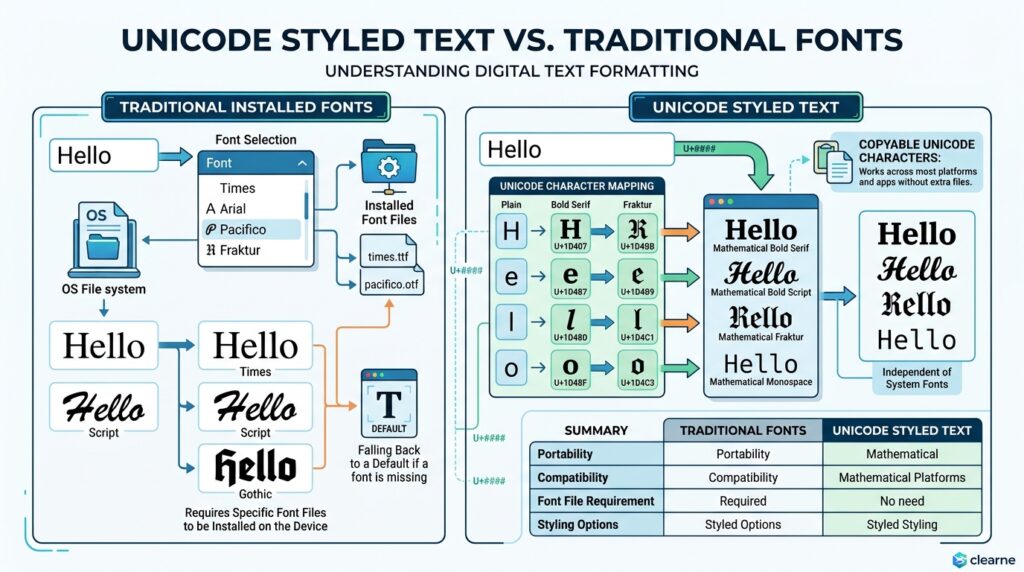
- Unicode Fonts vs. Regular Fonts
- How to Copy and Paste Telegram Fonts
- Using Telegram Fonts on Mobile
- Telegram Font Generator Examples
- Telegram Font Generator vs. Other Font Tools
- Common Problems With Telegram Fonts
- Tips for Choosing the Right Telegram Font
- Frequently Asked Questions
- Conclusion
Want to make your Telegram name, bio, channel title, group name, or messages look more creative?
A Telegram Font Generator helps you turn ordinary text into stylish Unicode characters that you can copy and paste into Telegram. You do not normally need to install a font or download an application. Instead, you type your text, choose a style, copy the result, and paste it into Telegram.
For example:
Normal text:
Telegram Channel
Stylish text:
𝓣𝓮𝓵𝓮𝓰𝓻𝓪𝓶 𝓒𝓱𝓪𝓷𝓷𝓮𝓵
You can also create styles such as:
- 𝐓𝐞𝐥𝐞𝐠𝐫𝐚𝐦 𝐂𝐡𝐚𝐧𝐧𝐞𝐥
- 𝔗𝔢𝔩𝔢𝔤𝔯𝔞𝔪 ℭ𝔥𝔞𝔫𝔫𝔢𝔩
- 𝙏𝙚𝙡𝙚𝙜𝙧𝙖𝙢 𝘾𝙝𝙖𝙣𝙣𝙚𝙡
- ᴛᴇʟᴇɢʀᴀᴍ ᴄʜᴀɴɴᴇʟ
- Ⓣⓔⓛⓔⓖⓡⓐⓜ Ⓒⓗⓐⓝⓝⓔⓛ
The important thing to understand is that these are usually Unicode characters, not traditional font files.
This guide explains how Telegram font generators work, where you can use stylish Telegram text, which styles are useful, what limitations to know about, and how CursiveTextGenerator.net compares with other online tools.
What Is a Telegram Font Generator?
A Telegram Font Generator is an online tool that converts ordinary text into different Unicode styles.
A normal font changes the visual appearance of letters while the underlying text stays the same. A Unicode generator works differently: it replaces supported characters with other Unicode characters that have a different visual appearance. cursive text generator
For example:
Normal:
Hello
Bold:
𝐇𝐞𝐥𝐥𝐨
Cursive:
𝓗𝓮𝓵𝓵𝓸
Gothic:
𝔢𝔩𝔩𝔬
Monospace:
𝙷𝚎𝚕𝚕𝚘
You can then copy the generated result and paste it into a supported Telegram field.
This is why these tools are often called “font generators,” even though they do not actually install fonts on your device.
Are Telegram Fonts Real Fonts?
Usually, no.
Most online Telegram font generators create Unicode text, rather than a downloadable font file.
For example, a traditional font can make the word:
Telegram
look different while keeping the underlying characters the same.
A Unicode generator can instead create:
𝓣𝓮𝓵𝓮𝓰𝓻𝓪𝓶
The characters themselves are different.
This is useful for copy-and-paste text because the styled characters can travel with the text into applications that support them. Current Telegram-specific generators also describe their output as Unicode characters rather than installed fonts.
However, Unicode styles have limitations. Some characters may render differently on different devices, and some styles may be less readable or less accessible than ordinary text.
How to Use a Telegram Font Generator
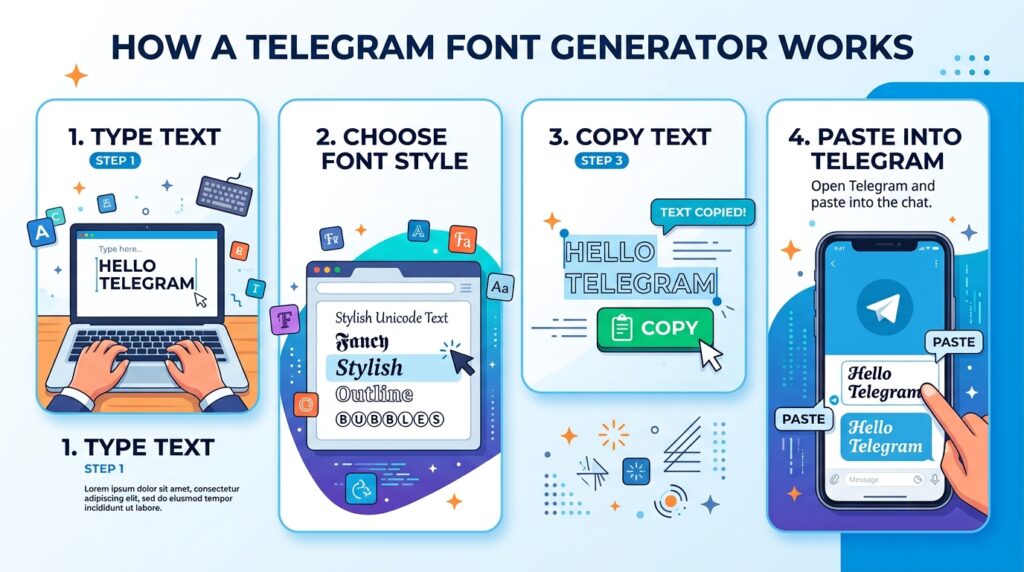
Using a Telegram font generator is usually straightforward.
Step 1: Open a Font Generator
Open a browser and visit a Unicode text generator such as CursiveTextGenerator.net.
Step 2: Enter Your Text
Type the word, name, phrase, bio, or channel title you want to style.
For example:
My Tech Channel
Step 3: Browse the Styles
The generator can display different versions of your text.
For example:
𝐌𝐲 𝐓𝐞𝐜𝐡 𝐂𝐡𝐚𝐧𝐧𝐞𝐥
𝓜𝔂 𝓣𝓮𝓬𝓱 𝓒𝓱𝓪𝓷𝓷𝓮𝓵
𝕸𝖞 𝕿𝖊𝖈𝖍 𝕮𝖍𝖆𝖓𝖓𝖊𝖑
𝙼𝚢 𝚃𝚎𝚌𝚑 𝙲𝚑𝚊𝚗𝚗𝚎𝚕
Step 4: Choose a Style
Choose a style based on your purpose.
For a channel name, bold or clean decorative text may work well.
For a personal bio, cursive or small caps may be suitable.
For a gaming group, Gothic or decorative text may fit the theme.
Step 5: Copy the Result
Use the copy option beside the style you want.
Step 6: Paste Into Telegram
Open Telegram and paste the generated text into the appropriate field.
Always check the final result after pasting because Unicode support and rendering can vary.
Where Can You Use Stylish Telegram Text?
Stylish Unicode text can be useful in several Telegram-related situations.
Telegram Display Name
Your Telegram display name is different from your public username.
For example:
Username:
@mytechchannel
Display name:
𝓜𝔂 𝓣𝓮𝓬𝓱 𝓒𝓱𝓪𝓷𝓷𝓮𝓵
This distinction matters because public usernames have different character rules. Telegram’s FAQ says usernames use letters, numbers, and underscores.
Therefore, do not assume that a decorative Unicode name can be used as an @username.
Telegram Bio
A stylish bio can add some personality to a profile.
For example:
Normal:
Digital creator | Tech lover
Styled:
𝑫𝒊𝒈𝒊𝒕𝒂𝒍 𝒄𝒓𝒆𝒂𝒕𝒐𝒓 | 𝑻𝒆𝒄𝒉 𝒍𝒐𝒗𝒆𝒓
Keep your bio readable, especially if it contains contact information or important details.
Telegram Channel Name
A channel title is one of the most visible parts of a Telegram channel.
For example:
TECH NEWS
could become:
𝗧𝗘𝗖𝗛 𝗡𝗘𝗪𝗦
or:
𝕋𝔼ℂℍ ℕ𝔼𝕎𝕊
Telegram-specific font tools commonly support channel titles as a use case for Unicode styling.
Telegram Group Name
You can also experiment with stylish group names.
Examples:
- 𝐆𝐚𝐦𝐢𝐧𝐠 𝐙𝐨𝐧𝐞
- 𝓕𝓻𝓲𝓮𝓷𝓭𝓼 𝓖𝓻𝓸𝓾𝓹
- 𝕋𝕖𝕔𝕙 𝕋𝕒𝕝𝕜
- Ⓜⓤⓢⓘⓒ Ⓛⓞⓥⓔⓡⓢ
Keep the name short enough to remain easy to recognize in Telegram’s interface.
Telegram Messages
Unicode text can also be used in short messages, announcements, headings, or decorative lines.
For example:
🔥 𝐍𝐞𝐰 𝐔𝐩𝐝𝐚𝐭𝐞
Then write the main information in normal text underneath.
This is often easier to read than making the entire message decorative.
Popular Telegram Font Styles
Different styles are useful for different situations.
| Style | Example | Useful For |
|---|---|---|
| Bold | 𝐓𝐞𝐥𝐞𝐠𝐫𝐚𝐦 | Headings and names |
| Italic | 𝑇𝑒𝑙𝑒𝑔𝑟𝑎𝑚 | Short decorative text |
| Bold Italic | 𝑻𝒆𝒍𝒆𝒈𝒓𝒂𝒎 | Strong headings |
| Cursive | 𝓣𝓮𝓵𝓮𝓰𝓻𝓪𝓶 | Bios and elegant names |
| Gothic | 𝔗𝔢𝔩𝔢𝔤𝔯𝔞𝔪 | Gaming and dark themes |
| Double Struck | 𝕋𝕖𝕝𝕖𝕘𝕣𝕒𝕞 | Creative profiles |
| Monospace | 𝚃𝚎𝚕𝚎𝚐𝚛𝚊𝚖 | Tech-related text |
| Small Caps | ᴛᴇʟᴇɢʀᴀᴍ | Short names |
| Circled | Ⓣⓔⓛⓔⓖⓡⓐⓜ | Fun profiles |
| Fullwidth | Telegram | Decorative text |
Not every style is equally suitable for every situation.
A clean bold style may be better for a channel title, while a cursive style may work better for a personal bio.
Telegram Font Generator Examples
Example 1: Telegram News Channel
Normal:
Daily News
Bold:
𝐃𝐚𝐢𝐥𝐲 𝐍𝐞𝐰𝐬
Cursive:
𝓓𝓪𝓲𝓵𝔂 𝓝𝓮𝔀𝓼
Double Struck:
𝔻𝕒𝕚𝕝𝕪 ℕ𝕖𝕨𝕤
Example 2: Gaming Group
Normal:
Pro Gamers
Bold:
🎮 𝐏𝐫𝐨 𝐆𝐚𝐦𝐞𝐫𝐬
Cursive:
⚡ 𝓟𝓻𝓸 𝓖𝓪𝓶𝓮𝓻𝓼
Gothic:
꧁ 𝕻𝖗𝖔 𝕲𝖆𝖒𝖊𝖗𝖘 ꧂
Example 3: Personal Bio
Normal:
Learning every day
Cursive:
𝓛𝓮𝓪𝓻𝓷𝓲𝓷𝓰 𝓮𝓿𝓮𝓻𝔂 𝓭𝓪𝔂 ✨
Small Caps:
ʟᴇᴀʀɴɪɴɢ ᴇᴠᴇʀʏ ᴅᴀʏ
These examples can be used as inspiration. Enter your own text into a generator to see which characters are available.
Telegram Font Generator vs Native Telegram Formatting
Unicode fonts and Telegram’s built-in formatting are not the same thing.
Telegram supports native formatting for messages, including options such as bold, italic, underline, strikethrough, spoiler, links, code, and quotes through its formatting systems.
Native Telegram formatting is useful for:
- Important messages
- Long text
- Links
- Code
- Quotes
- Structured announcements
- Accessible formatting
Unicode styling is useful for:
- Display names
- Decorative headings
- Channel titles
- Group names
- Short bios
- Short visual accents
For example:
Native formatting idea:
Important Update
Unicode styling:
𝓘𝓶𝓹𝓸𝓻𝓽𝓪𝓷𝓽 𝓤𝓹𝓭𝓪𝓽𝓮
They solve different problems.
Why Use Unicode Text Instead of an Installed Font?
An installed font normally affects how text is displayed on a particular device or inside a particular application.
Unicode text is different.
The characters themselves contain the styling information.
For example:
Hello
can become:
𝐇𝐞𝐥𝐥𝐨
The second version contains different Unicode characters.
This makes copy and paste possible across applications that support those characters.
That is why you can generate the text in a browser and then paste it into Telegram.
However, it does not mean every Unicode style will look identical everywhere.
Important Difference Between a Telegram Username and Name
This is one of the most common sources of confusion.
A Telegram display name and a Telegram @username serve different purposes.
For example:
Display name:
𝓐𝔀𝓪𝓲𝓼 𝓣𝓮𝓬𝓱
Username:
@awaitech
The public username is subject to Telegram’s username rules. Telegram’s FAQ explains that usernames use letters, numbers, and underscores.
Therefore, if a stylish version does not work in your username field, that does not necessarily mean the font generator is broken.
The field itself has different requirements.
How to Make a Stylish Telegram Bio
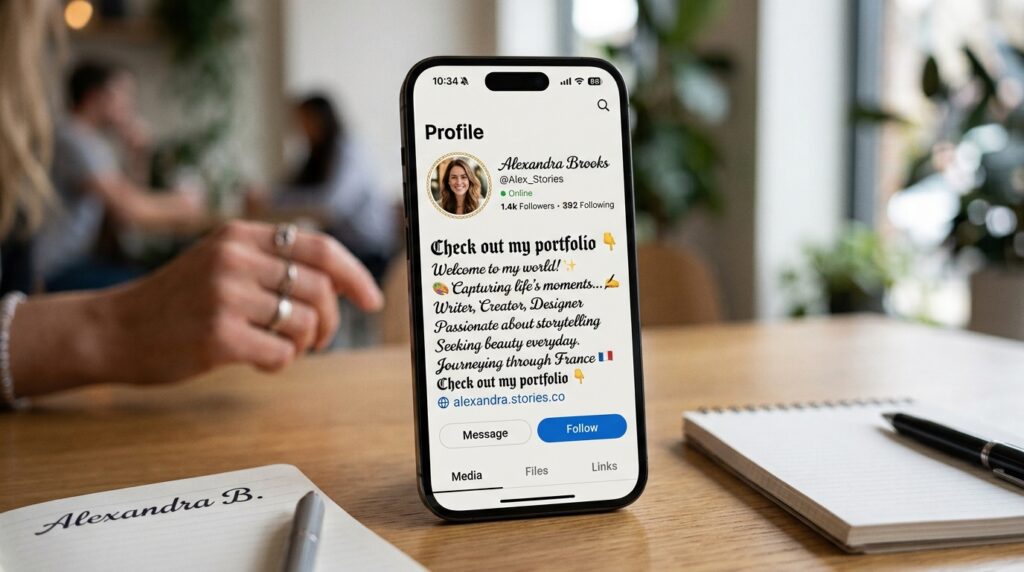
Creating a stylish Telegram bio is easy.
Step 1: Write Your Normal Bio
For example:
Digital creator | Tech lover | Learning every day
Step 2: Choose One Main Style
You could style the first part:
𝑫𝒊𝒈𝒊𝒕𝒂𝒍 𝒄𝒓𝒆𝒂𝒕𝒐𝒓
Step 3: Add a Simple Emoji
For example:
💻 𝑫𝒊𝒈𝒊𝒕𝒂𝒍 𝒄𝒓𝒆𝒂𝒕𝒐𝒓
Step 4: Keep Important Details Plain
If your bio includes a website, username, phone number, or other information people need to copy, normal text is usually easier to use.
Stylish Telegram Channel Name Ideas
Here are a few examples.
News
- 𝐃𝐚𝐢𝐥𝐲 𝐍𝐞𝐰𝐬
- 𝘿𝙖𝙞𝙡𝙮 𝙉𝙚𝙬𝙨
- 𝔻𝕒𝕚𝕝𝕪 ℕ𝕖𝕨𝕤
Technology
- 𝓣𝓮𝓬𝓱 𝓝𝓮𝔀𝓼
- 𝗧𝗲𝗰𝗵 𝗗𝗮𝗶𝗹𝘆
- 𝕋𝕖𝕔𝕙 𝕎𝕠𝕣𝕝𝕕
Gaming
- 🎮 𝐆𝐚𝐦𝐢𝐧𝐠 𝐙𝐨𝐧𝐞
- ⚡ 𝓖𝓪𝓶𝓮𝓻𝓼 𝓗𝓾𝓫
- ꧁𝕲𝖆𝖒𝖎𝖓𝖌 𝕮𝖑𝖚𝖇꧂
Education
- 📚 𝐋𝐞𝐚𝐫𝐧𝐢𝐧𝐠 𝐇𝐮𝐛
- 𝓢𝓽𝓾𝓭𝔂 𝓩𝓸𝓷𝓮
- 𝗘𝗱𝘂𝗰𝗮𝘁𝗶𝗼𝗻 𝗗𝗮𝗶𝗹𝘆
Telegram Font Generator on Mobile
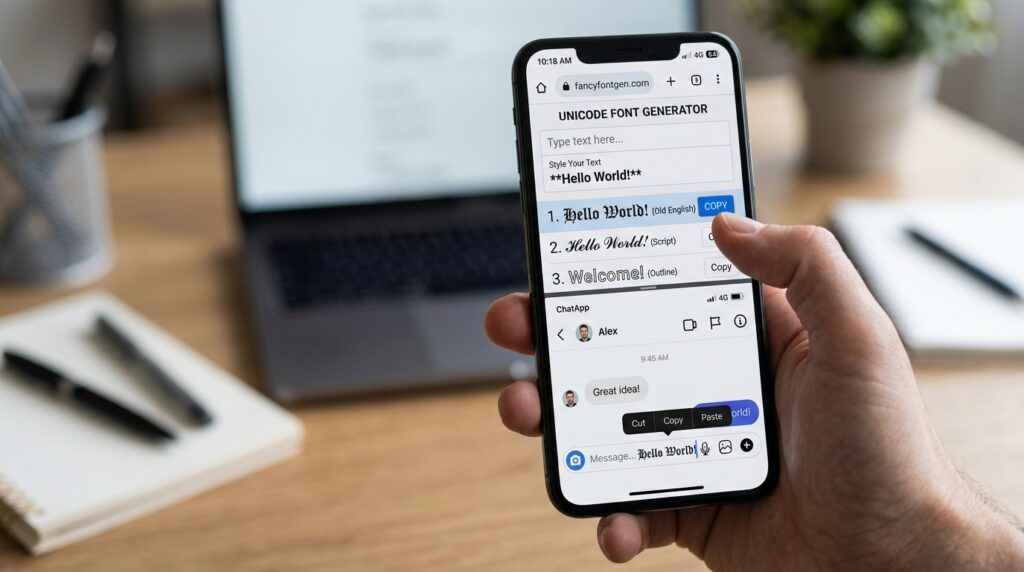
You can use a Telegram font generator from a smartphone browser.
The basic process is:
Browser → Generator → Type Text → Choose Style → Copy → Telegram → Paste
This works well when you want to create:
- Telegram bios
- Profile names
- Channel names
- Group names
- Short announcements
- Decorative headings
A browser-based tool also means you do not necessarily need another application installed on your phone.
What Happens If a Unicode Font Does Not Display Correctly?
Sometimes you may see:
- Empty boxes
- Strange symbols
- Missing letters
- Different-looking characters
- Unusual spacing
This can happen because Unicode characters depend on the fonts and rendering support available on the receiving device or application.
A current Telegram-specific generator also advises users to test pasted results because device fonts and operating systems can render some characters differently.
What should you do?
Try a simpler style.
For example, if a decorative Gothic style does not display correctly, test:
𝐓𝐞𝐥𝐞𝐠𝐫𝐚𝐦
or:
𝙏𝙚𝙡𝙚𝙜𝙧𝙖𝙢
Simple Unicode styles are generally easier to understand and test.
Keep Links, Usernames and Commands Plain
Do not decorate everything.
For example, if your Telegram post contains:
keep the URL normal.
The same applies to:
@usernames- Hashtags
- Bot commands
- Contact information
- Important technical text
Some Telegram font tools specifically recommend protecting links, handles, hashtags, and commands so they remain functional.
A better layout is:
🔥 𝐍𝐞𝐰 𝐀𝐫𝐭𝐢𝐜𝐥𝐞
Read the full article here:
This gives you decoration without making the useful information harder to use.
Do Not Make Every Message Fancy
Stylish text is most useful when used selectively.
Compare these two examples.
Too much styling
꧁༺🔥 𝓦𝓔𝓛𝓒𝓞𝓜𝓔 𝓣𝓞 𝓞𝓤𝓡 𝓒𝓗𝓐𝓝𝓝𝓔𝓛 🔥༻꧂
Cleaner version
🔥 𝐖𝐞𝐥𝐜𝐨𝐦𝐞 𝐭𝐨 𝐨𝐮𝐫 𝐜𝐡𝐚𝐧𝐧𝐞𝐥
Both are decorative, but the second is easier to scan.
For long Telegram messages, normal text with a stylish heading is often a better choice.
5+ Telegram Font Generator Comparison
There are several websites offering Telegram-focused Unicode generators. Their style libraries and features can change, so always check the live tool before publishing claims about a specific number of styles.
| Tool | Main Purpose | Styles/Options | Copy & Paste | Ease of Use | Mobile Use | Extra Features |
|---|---|---|---|---|---|---|
| CursiveTextGenerator.net | General stylish and Unicode text | Multiple text styles | Yes | Simple | Browser-based | Other text-generation tools |
| AlphaFonts | Telegram-focused Unicode text | Multiple Telegram styles | Yes | Simple | Browser-based | Style search and compatibility guidance |
| Fontalic | Telegram names, bios, channels and messages | 12 listed styles | Yes | Simple | Browser-based | Protection for links, handles, hashtags and commands |
| FontGenTools | Telegram copy-and-paste fonts | Large style collection | Yes | Simple | Browser-based | Categories such as bold, cursive, Gothic, bubble and typewriter |
| The Divine Writer | Unicode text for Telegram and other apps | Bold, italic, script, Gothic, double-struck, monospace and more | Yes | Simple | Browser-based | Unicode explanations |
| FancyTextStyle | Telegram-focused fancy text | Bold, cursive, Fraktur, bubble, boxed and other categories | Yes | Feature-rich | Browser-based | Multiple style categories and combinations |
AlphaFonts currently provides a Telegram-specific generator with live style previews, copying, style search, and guidance about the difference between a display name and username.
Fontalic currently lists 12 copyable Unicode styles and includes options for keeping functional tokens such as links, handles, hashtags, and commands plain.
FontGenTools currently provides a large collection of Telegram styles and categories including bold, italic, cursive, Gothic, bubble, typewriter, professional, strikethrough, and decorative styles.
The Divine Writer provides styles such as bold, italic, bold italic, cursive script, bold script, Gothic, double-struck, monospace, small caps, circled, squared, and fullwidth.
FancyTextStyle currently separates its Telegram styles into categories such as bold and clean, cursive and elegant, Gothic and dark, bubble and circled, squared and boxed, aesthetic, and glitch styles.
Why Try CursiveTextGenerator.net for Telegram Text?
CursiveTextGenerator.net can be useful if you want a general stylish text generator rather than a tool designed only around Telegram.
The advantage of a general Unicode text tool is that the same generated text can often be tested on different platforms.
For example, you could create:
𝓜𝔂 𝓣𝓮𝓬𝓱 𝓒𝓱𝓪𝓷𝓷𝓮𝓵
and then test it in Telegram, Instagram, WhatsApp, Discord, or another application that supports the characters.
The site also has other text-related tools, including an Instagram Font Generator and Urdu text-generation resources.
That makes it useful if you work with stylish text across more than one platform.
However, the right choice depends on what you need. If you specifically want Telegram-focused instructions and filtering, a dedicated Telegram generator may be more suitable. If you want a broader collection of stylish text tools, CursiveTextGenerator.net can be a convenient starting point.
Telegram Font Generator vs Other Font Tools
The term “font generator” can mean several different things online.
Unicode Text Generator
Creates copyable Unicode characters.
Example:
𝐓𝐞𝐥𝐞𝐠𝐫𝐚𝐦
Best for:
- Names
- Bios
- Short headings
- Social profiles
- Copy and paste
Font Generator for Websites
May generate CSS or downloadable font resources.
Best for:
- Websites
- Graphic design
- Web development
Image Text Generator
Creates an image containing styled text.
Best for:
- Posters
- Social graphics
- Banners
For Telegram names and bios, Unicode text is usually the more practical format because you can copy and paste it directly.
How to Choose the Best Telegram Font Style
There is no single style that works for every situation.
Use these guidelines.
| Goal | Suggested Style |
|---|---|
| Professional channel | Bold or clean sans style |
| Personal profile | Cursive |
| Gaming group | Gothic or bold |
| Tech channel | Monospace or bold |
| Short bio | Cursive or small caps |
| Announcement heading | Bold |
| Fun group | Circled or decorative |
| Long message | Normal text with a styled heading |
The most important rule is readability.
A style may look impressive in the generator but become difficult to understand after you paste it into Telegram.
Is a Telegram Font Generator Free?
Many online Telegram font generators are free to use.
Several current tools offer browser-based copy-and-paste generation without requiring an app installation.
CursiveTextGenerator.net is also designed as a browser-based copy-and-paste text tool.
Always check the specific website before assuming that every feature will remain free, because websites can change their offerings.
Do I Need to Download a Telegram Font?
No.
For Unicode-style text, you normally only need a browser.
The process is:
- Open a font generator.
- Enter your text.
- Select a style.
- Copy the result.
- Paste it into Telegram.
You do not need to install a font file for this process.
Can Telegram Fonts Be Used on Android, iPhone and Desktop?
Unicode text can be copied from a browser and pasted into Telegram on different devices.
However, the exact appearance can depend on the device’s font support and rendering system.
That is why it is useful to check your final text on the device where you expect your audience to see it.
For important channel names or business information, choose simple styles instead of unusual Unicode combinations.
Tips for Better Telegram Stylish Text
1. Keep It Short
Decorative text is easier to read when it is short.
2. Use One Main Style
Avoid combining too many different styles in one heading.
3. Test Before Publishing
Copy the result into Telegram and check how it looks.
4. Keep Functional Information Normal
URLs, handles, commands, and contact information are usually better left untouched.
5. Think About Mobile Users
Most people will probably see Telegram content on a relatively small screen.
6. Avoid Excessive Decoration
A few symbols can add personality. Too many can make the text difficult to scan.
Telegram Font Generator for Gaming Names
Gamers often want more distinctive names for Telegram groups and communities.
For example:
Normal:
Shadow Squad
Bold:
𝐒𝐡𝐚𝐝𝐨𝐰 𝐒𝐪𝐮𝐚𝐝
Gothic:
𝕾𝖍𝖆𝖉𝖔𝖜 𝕾𝖖𝖚𝖆𝖉
Decorated:
『𝐒𝐡𝐚𝐝𝐨𝐰 𝐒𝐪𝐮𝐚𝐝』
You can also combine a short Unicode style with an emoji:
⚡ 𝐒𝐡𝐚𝐝𝐨𝐰 𝐒𝐪𝐮𝐚𝐝
The best gaming name is still one that members can recognize and remember.
Telegram Font Generator for Business Channels
Business and professional channels should generally favor readability.
For example:
𝐃𝐢𝐠𝐢𝐭𝐚𝐥 𝐌𝐚𝐫𝐤𝐞𝐭𝐢𝐧𝐠 𝐍𝐞𝐰𝐬
can look more structured than:
꧁༺𝓓𝓲𝓰𝓲𝓽𝓪𝓵 𝓜𝓪𝓻𝓴𝓮𝓽𝓲𝓷𝓰 𝓝𝓮𝔀𝓼༻꧂
For a professional brand, a simple bold style can be easier to recognize.
Telegram Font Generator for Personal Profiles
Personal profiles give you more freedom.
You can use:
- Cursive
- Small caps
- Bold
- Italic
- Double-struck
- Simple symbols
- Emoji combinations
For example:
✨ 𝓐𝔀𝓪𝓲𝓼 | 𝓣𝓮𝓬𝓱 𝓛𝓸𝓿𝓮𝓻
The key is to keep the final profile easy to read.
Common Telegram Font Generator Problems
Problem 1: Some Letters Stay Normal
Not every Unicode style has a matching character for every letter, number, accent, or writing system.
Some generators leave unsupported characters unchanged.
Solution
Try another style or keep unsupported parts in normal text.
Problem 2: The Text Shows Boxes
This usually indicates that the receiving device or font does not support a character.
Solution
Use a simpler Unicode style.
Problem 3: A Username Does Not Accept the Text
This may be because the username field has stricter character requirements.
Solution
Use stylish Unicode in an appropriate display field instead of assuming it can be used in the @username.
Problem 4: The Text Is Difficult to Search
Some styled characters are different Unicode characters from ordinary letters.
Solution
Keep important searchable information in normal text when practical.
Problem 5: The Style Looks Different on Another Device
Unicode rendering can vary.
Solution
Test the text on the devices that matter to your audience.
Final Thoughts
A Telegram Font Generator is a simple way to create stylish copy-and-paste text without installing a traditional font.
You can use Unicode styles for display names, bios, channel titles, group names, short announcements, and decorative headings.
The basic process is simple:
Type → Choose a style → Copy → Paste into Telegram
Remember that Unicode text is different from Telegram’s native formatting. Telegram also provides its own formatting tools for messages, while Unicode generators are more useful when you want decorative characters that can be copied into supported fields.
For the best results, use stylish text selectively. Keep URLs, usernames, commands, and other functional information readable. Test unusual Unicode styles before publishing them, especially if your Telegram community includes users on different devices.
If you want a general-purpose stylish text generator that can also be useful outside Telegram, CursiveTextGenerator.net is worth trying. It can be useful when you want to create copy-and-paste text and then use the same style across different platforms.
Frequently Asked Questions
1. What is a Telegram Font Generator?
A Telegram Font Generator converts ordinary text into stylish Unicode characters that can be copied and pasted into supported Telegram fields.
2. Are Telegram fonts real fonts?
Usually not. Most Telegram font generators create Unicode characters rather than installing a traditional font file.
3. Can I copy stylish text into Telegram?
Yes. Unicode-styled text can be copied and pasted into Telegram where the relevant field accepts those characters.
4. Can I use stylish text in my Telegram bio?
Yes, you can use supported Unicode characters in your profile bio.
5. Can I use fancy text in a Telegram channel name?
You can use supported Unicode characters in channel titles, but you should check the final appearance before publishing.
6. Can I use stylish text in a Telegram group name?
Yes, supported Unicode text can be used for decorative group names.
7. Can I make my Telegram username stylish?
Do not assume so. Telegram usernames have specific character requirements and are different from display names.
8. Do I need an app to create Telegram fonts?
No. A browser-based Unicode generator can create copy-and-paste text.
9. Can I use Telegram fonts on Android?
Yes. You can generate Unicode text in a mobile browser and paste it into Telegram.
10. Can I use Telegram fonts on iPhone?
Yes. The same basic copy-and-paste process works through a browser.
11. Why do some stylish letters appear as boxes?
The receiving device or application may not support a particular Unicode character.
12. Why does stylish text look different on another device?
Different devices and operating systems may render Unicode characters differently.
13. Can I use stylish fonts in Telegram messages?
Yes, supported Unicode characters can be pasted into messages. Telegram also provides native message formatting.
14. Should I use stylish Unicode in Telegram links?
It is better to keep URLs in normal text so they remain easy to use.
15. Can I use emojis with Telegram fonts?
Yes. Unicode text can be combined with ordinary emoji.
Example:
✨ 𝓜𝔂 𝓣𝓮𝓵𝓮𝓰𝓻𝓪𝓶 𝓒𝓱𝓪𝓷𝓷𝓮𝓵 ✨
16. Which Telegram font style is easiest to read?
Simple bold, italic, small caps, and moderate script styles are generally easier to read than heavily decorated combinations.
17. Is CursiveTextGenerator.net useful for Telegram?
Yes. Its general stylish-text tools can be used to create Unicode text that you can test in Telegram.
18. Can I use Gothic text on Telegram?
Yes, supported Gothic-style Unicode characters can be copied and tested in Telegram.
19. Can I create a stylish Telegram gaming name?
Yes. You can combine Unicode styles with symbols or emoji to create a gaming-style name.
20. Is a Telegram font generator the same as Telegram’s native formatting?
No. A Unicode generator changes the characters themselves, while Telegram’s native formatting applies formatting to message text.