
Your WhatsApp About section is a tiny window into your personality — and most people completely ignore it. But what if your About could make someone smile, feel inspired, or even ask, “How did you do that?” That’s exactly the power of using WhatsApp About stylish text with emoji.
Whether you want to show off your creative side, express your mood, or just make your profile look cooler than everyone else’s, combining fancy fonts with emoji is the perfect way to do it. The best part? You don’t need any design skills or apps. Tools like cursivetextgenerator.net make it incredibly easy to generate eye-catching stylish text that you can copy and paste directly into your WhatsApp About in seconds.
In this guide, you’ll learn exactly what stylish text is, why it works so well with emoji, how to create it, and some ready-to-use examples you can steal right now.
What Is Stylish Text for WhatsApp About?
Stylish text refers to text written using special Unicode characters that look like decorative or fancy fonts — but are actually just special characters your phone can display anywhere, including WhatsApp.
Unlike regular letters (A, B, C), stylish text uses characters like:
- 𝒜, ℬ, 𝒞 (cursive/script)
- 𝔄, 𝔅, ℭ (Gothic/blackletter)
- 𝐀, 𝐁, 𝐂 (bold)
- 🅐, 🅑, 🅒 (enclosed)
Because these are Unicode characters — not images — they paste perfectly into WhatsApp’s About field without any special app or permission.
When you pair these stylish fonts with emoji like 🌙✨💫🔥❤️, you get an About section that instantly grabs attention and shows off your personality.
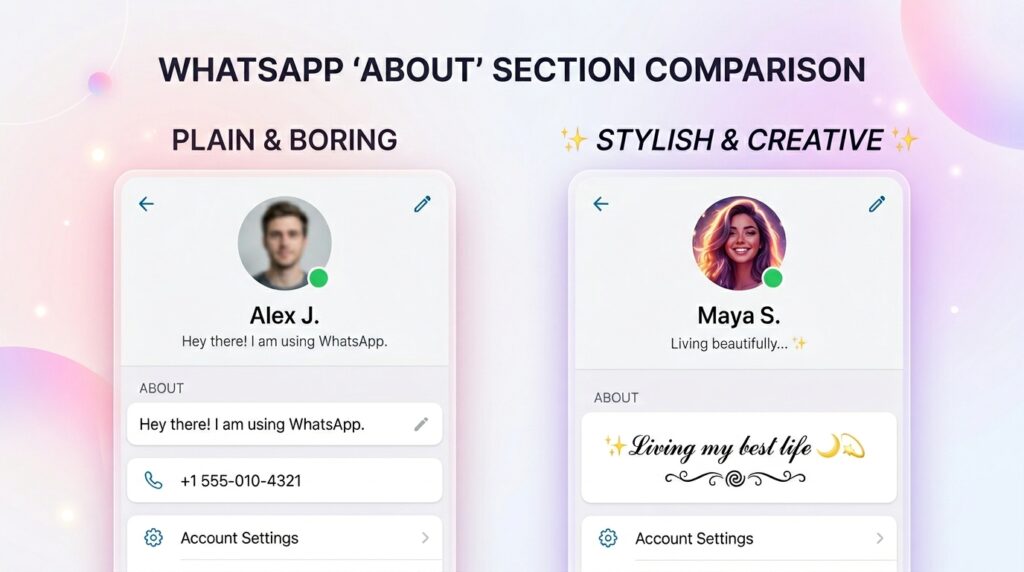
Why Use Stylish Text with Emoji in Your WhatsApp About?
Most people leave their WhatsApp About as the default “Hey there! I am using WhatsApp” — which says absolutely nothing about who they are. Here’s why switching to stylish text with emoji is worth it:
✅ It Makes You Memorable
A beautifully styled About section leaves a lasting impression on anyone who visits your profile — friends, family, or new contacts.
✅ It Expresses Your Personality
Whether you’re funny, romantic, spiritual, or ambitious, the right combination of stylish fonts and emoji communicates your vibe instantly.
✅ It’s Completely Free
Using a free cursive text generator costs nothing. You generate, you copy, you paste — done.
✅ It Works Without Any App
Because stylish text is just Unicode, WhatsApp displays it perfectly on all phones — Android or iPhone.
✅ It’s Easy to Update
You can change your About section anytime to match your current mood, season, or life event.
How to Create WhatsApp About Stylish Text with Emoji (Step-by-Step)
Creating a stunning WhatsApp About with stylish text and emoji takes less than two minutes. Here’s exactly how to do it:
Step 1: Go to a Stylish Text Generator
Open your browser and visit cursivetextgenerator.net. This free tool offers dozens of font styles including cursive, bold, italic, Gothic, and more.
Step 2: Type Your About Text
In the input box, type your WhatsApp About message. For example:
Living my best life
Step 3: Choose Your Font Style
Browse the generated styles and pick the one that matches your personality. Options include:
- Cursive/Script: 𝓛𝓲𝓿𝓲𝓷𝓰 𝓶𝔂 𝓫𝓮𝓼𝓽 𝓵𝓲𝓯𝓮
- Bold Italic: 𝑳𝒊𝒗𝒊𝒏𝒈 𝒎𝒚 𝒃𝒆𝒔𝒕 𝒍𝒊𝒇𝒆
- Gothic: 𝔏𝔦𝔳𝔦𝔫𝔤 𝔪𝔶 𝔟𝔢𝔰𝔱 𝔩𝔦𝔣𝔢
Step 4: Copy the Stylish Text
Click the Copy button next to your preferred style.
Step 5: Add Emoji
Open a keyboard or emoji picker and sprinkle in relevant emoji. For example:
✨ 𝓛𝓲𝓿𝓲𝓷𝓰 𝓶𝔂 𝓫𝓮𝓼𝓽 𝓵𝓲𝓯𝓮 🌙💫
Step 6: Paste into WhatsApp About
Open WhatsApp → Tap your profile photo → Tap About → Delete the old text → Paste your new stylish text → Save.
That’s it! Your WhatsApp About is now uniquely yours.
Best Stylish Text + Emoji Combinations for WhatsApp About
Here are ready-to-use examples across different moods and themes. Just copy, paste, and customize!
🌸 Aesthetic & Dreamy
✨ 𝓓𝓻𝓮𝓪𝓶𝓲𝓷𝓰 𝓫𝓲𝓰 & 𝓼𝓽𝓪𝔂𝓲𝓷𝓰 𝓰𝓻𝓪𝓬𝓮𝓯𝓾𝓵 🌙🌸
💪 Motivational
🔥 𝐇𝐮𝐬𝐭𝐥𝐞 𝐡𝐚𝐫𝐝, 𝐬𝐭𝐚𝐲 𝐡𝐮𝐦𝐛𝐥𝐞 💯⚡
😄 Funny & Witty
😂 𝔐𝔶 𝔟𝔢𝔡 𝔦𝔰 𝔪𝔶 𝔟𝔢𝔰𝔱 𝔣𝔯𝔦𝔢𝔫𝔡 🛌💤
❤️ Romantic
💕 𝒀𝒐𝒖𝒓 𝒍𝒐𝒗𝒆 𝒊𝒔 𝒎𝒚 𝒔𝒖𝒑𝒆𝒓𝒑𝒐𝒘𝒆𝒓 🌹✨
🙏 Spiritual & Peaceful
☮️ 𝓟𝓮𝓪𝓬𝓮 𝓲𝓷 𝓶𝔂 𝓱𝓮𝓪𝓻𝓽, 𝓱𝓸𝓹𝓮 𝓲𝓷 𝓶𝔂 𝓼𝓸𝓾𝓵 🌿🤍
🎓 Student Life
📚 𝗦𝘁𝘂𝗱𝘆𝗶𝗻𝗴 𝘁𝗼𝗱𝗮𝘆, 𝗦𝘂𝗰𝗰𝗲𝗲𝗱𝗶𝗻𝗴 𝘁𝗼𝗺𝗼𝗿𝗿𝗼𝘄 🎓🚀
Top Font Styles for WhatsApp About Text
Not all fonts work equally well in a short About section. Here’s a quick comparison of the most popular styles available on cursivetextgenerator.net:
| Font Style | Example | Best For |
|---|---|---|
| Cursive/Script | 𝓗𝓮𝓵𝓵𝓸 | Romantic, aesthetic bios |
| Bold Serif | 𝐇𝐞𝐥𝐥𝐨 | Motivational, strong statements |
| Gothic/Blackletter | 𝔥𝔢𝔩𝔩𝔬 | Edgy, dark, or dramatic vibes |
| Italic | 𝐻𝑒𝑙𝑙𝑜 | Elegant, simple bios |
| Bubble/Enclosed | 🅗🅔🅛🅛🅞 | Fun, playful, youthful |
| Double Struck | ℍ𝕖𝕝𝕝𝕠 | Creative, unique profiles |
For the most elegant options, check out these elegant cursive fonts that look stunning in any About section.
Emoji Tips: Which Emoji Work Best in WhatsApp About?
Emoji are like seasoning — the right ones add flavour, but too many ruin the dish. Here’s how to use them smartly:
Use emoji that match your message:
- 🌙 = night owl, dreamer, night life
- 🔥 = passion, hustle, energy
- 💎 = luxury, value, class
- 🌿 = calm, nature, peace
- 🎵 = music lover
- ✈️ = traveller, wanderlust
- 📖 = reader, student, thinker
Golden rules for emoji in WhatsApp About:
- Use 2–4 emoji maximum — don’t clutter your About
- Place emoji at the start or end of lines for clean formatting
- Match the mood — don’t mix fire 🔥 with peace ☮️ randomly
- Use single-colour emoji for a more aesthetic look (🤍🖤🤎)
Use Stylish Text Across Other Platforms Too
Once you start using stylish text, you’ll want to use it everywhere! The same fonts and techniques work across multiple platforms:
- TikTok bios & captions — try the TikTok stylish text tool for platform-specific styles
- Instagram bios — cursive and bold fonts look amazing in IG profiles
- Facebook status updates — make your posts pop in crowded feeds
- Twitter/X bios — stand out in a sea of plain text
- Telegram bios — same Unicode works perfectly there too
If you write in other languages, the Urdu stylish text generator is perfect for creating beautiful Urdu About sections for WhatsApp.
And if you’re looking for even more creative options, explore beautiful cursive fonts that bring a premium feel to any text.
Common Mistakes to Avoid When Writing Your WhatsApp About
Even with stylish text and emoji, some common mistakes can ruin your About section:
- ❌ Using too many font styles — stick to one font style per About
- ❌ Overloading with emoji — 8+ emoji looks messy, not aesthetic
- ❌ Copying someone else’s About word-for-word — be original
- ❌ Making it too long — WhatsApp About has a 139-character limit
- ❌ Using unreadable fonts — some Gothic styles can be hard to read in small sizes
- ❌ Ignoring your audience — your About is public to your contacts; keep it appropriate
Conclusion
Your WhatsApp About is more than just a status line — it’s your personal brand in a tiny space. By combining stylish text with emoji, you can express your personality, make people smile, and leave an unforgettable first impression with just a few characters.
The easiest way to get started is by using the cursive text generator at cursivetextgenerator.net — it’s completely free, requires no sign-up, and gives you dozens of font styles to choose from in seconds. Pick your style, add your favourite emoji, and paste it into WhatsApp. It really is that simple.
Go ahead — give your WhatsApp About the glow-up it deserves! ✨
FAQ
Can I use stylish text in my WhatsApp About section?
Yes! WhatsApp supports Unicode characters, which means stylish text generated by tools like cursivetextgenerator.net displays perfectly in your About section on both Android and iPhone.
Is there a character limit for WhatsApp About?
Yes. WhatsApp allows a maximum of 139 characters in the About section. Keep your stylish text and emoji combination within this limit.
Will stylish text look the same on all phones?
Stylish text is made of Unicode characters, so it displays correctly on most modern smartphones. However, very old devices may show plain boxes (□) instead of some characters.
Do I need to download an app to use stylish text on WhatsApp?
No app download is needed. Simply visit cursivetextgenerator.net in your browser, generate your text, copy it, and paste it directly into WhatsApp.